Most of what I write about .NET is about the security side of ASP.NET Core: how a user gets signed in, what ends up in the cookie or the token, and why it sometimes breaks. This page puts those posts in a sensible reading order. All my .NET posts are listed at the bottom.
What Is ASP.NET Core?
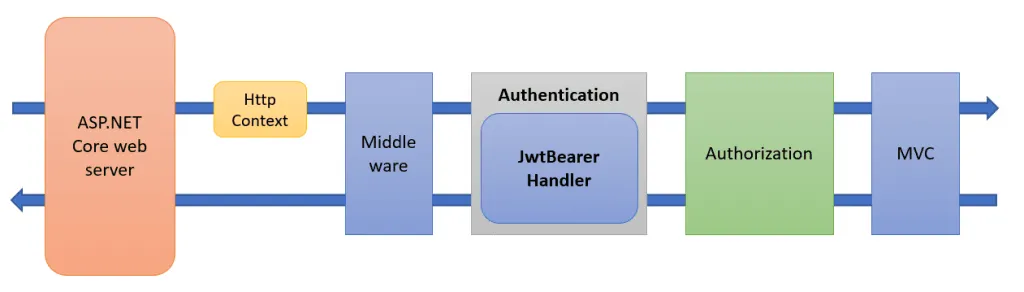
ASP.NET Core is Microsoft's open-source, cross-platform framework for building web applications and APIs on .NET. Every request passes through a pipeline of middleware. Authentication, authorization, cookies and forwarded headers are all handled by middleware and handlers in that pipeline, so the order and the configuration of that pipeline decide whether your users get signed in.
Why I Write About the Security Side
I have worked with .NET since 2002. When something in ASP.NET Core does not behave the way I expect, I download the framework source and step through it until I understand what happens. Many of the posts below started that way. Authentication is the part customers find hardest, so that is what I write about most.
What Goes Wrong in Practice
The same problems come up again and again, in questions from developers, in my workshops and in client projects:
- The browser rejects the cookie. A cookie with
SameSite=Nonemust also beSecure, so sign-in over plain HTTP fails in ways that are easy to miss. Chrome's DevTools show which cookie was blocked and why. - The authentication cookie grows too big. Add OpenID Connect and the tokens, and ASP.NET Core splits the cookie into chunks. A session store keeps the cookie small and lets you end a session on the server.
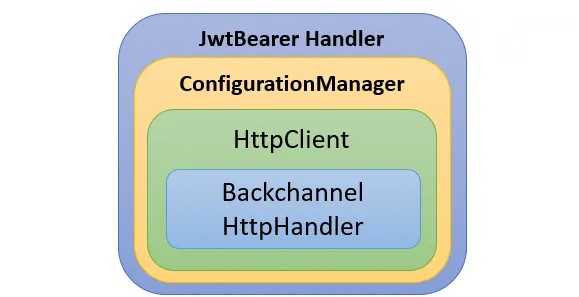
- The API returns 401 or 403, and nobody knows why. A 401 comes from the JwtBearer handler: the token is missing or not accepted. A 403 comes from authorization: the token is fine, but a claim or policy is not. The
WWW-Authenticateheader and the logs usually tell you which. - Claims are renamed or missing. By default, ASP.NET Core maps incoming claim names to the long Microsoft claim types, so
roleornameis not where your code looks for it. - The app is behind a proxy and does not know it. Without the Forwarded Headers Middleware, ASP.NET Core sees the proxy's IP address, scheme and host instead of the client's. That gives you broken links and the wrong IP address in your logs.
- The Data Protection key ring is not persisted. The keys protect your cookies, so a restart, a redeploy or a second instance signs everyone out.
Most of these come down to not knowing what goes over the wire. I use Fiddler a lot, and many of the posts below show the actual HTTP traffic.
Sign-In, Tokens and the BFF Pattern
Three of the bigger topics have their own pages, with a reading list each:
- IdentityServer: what Duende IdentityServer is, how to set it up, and how to run it in Docker.
- OpenID Connect and OAuth: the login flow seen from ASP.NET Core: state and nonce, claims, PAR and custom parameters.
- The BFF pattern: how to keep tokens out of single-page apps with a Backend-for-Frontend in ASP.NET Core.
Start Here
1. Cookies and how sign-in works
- Exploring what is inside the ASP.NET Core cookies: the authentication, session and antiforgery cookies, and how the Data Protection API protects them.
- Debugging cookie problems in ASP.NET Core: cookies the browser rejects or never sends, and the SameSite rules behind them.
- Improving ASP.NET Core Security By Putting Your Cookies On A Diet: a smaller authentication cookie with a session store, and why that is safer.
- BearerToken: The new Authentication handler in ASP.NET Core 8: how the BearerToken handler compares to the Cookie and JwtBearer handlers.
2. Protect your APIs with JwtBearer
- Troubleshooting JwtBearer authentication issues in ASP.NET Core: 401 or 403 from your API, and how to find out why.
- Debugging JwtBearer Claim Problems in ASP.NET Core: missing or renamed claims in the access token,
MapInboundClaimsand the name and role claim types. - ASP.NET Core 6 - JwtBearer library: what's new?: what changed in the JwtBearer library from 3.1 to 6.
3. Run behind a reverse proxy
- Exploring the Forwarded Headers Middleware in ASP.NET Core: what the
X-Forwarded-*headers do, and how they restore the client IP, scheme and host. - Configuring ASP.NET Core Forwarded Headers Middleware: which headers to process, which proxies to trust,
AllowedHostsand theASPNETCORE_FORWARDEDHEADERS_ENABLEDvariable.
4. Keep the Data Protection keys safe
- Persisting the ASP.NET Core Data Protection Key Ring in Azure Key Vault: keep cookies and sign-in working across restarts and instances.
- Introducing the Data Protection API Key Ring Debugger: a small tool I wrote to look inside the key ring.
5. Other .NET posts
- How to Use KurrentDB for Event Sourcing in C# on Azure: run KurrentDB in Azure and append and read events from C#.
- Discovering .NET codebases using code coverage and NCrunch: how I learn an unfamiliar library by running one test with code coverage.
Frequently Asked Questions
Why does my ASP.NET Core API return 401 Unauthorized?
A 401 usually comes from the JwtBearer handler, and it means the access token was missing or not accepted. Look at the WWW-Authenticate response header first. Set IncludeErrorDetails to true in the JwtBearer options, and the header tells you why, for example that the signature is invalid. If you get 403 instead, the token was accepted and the problem is in authorization. My post Troubleshooting JwtBearer authentication issues goes through it step by step.
Why are my claims renamed or missing in ASP.NET Core?
By default, the JwtBearer and OpenID Connect handlers map short claim names such as role to long Microsoft claim type URIs. Set MapInboundClaims to false to keep the original names, and tell ASP.NET Core which claims hold the user's name and roles. For APIs, see Debugging JwtBearer Claim Problems. For sign-in, see Debugging OpenID Connect Claim Problems.
What does ASPNETCORE_FORWARDEDHEADERS_ENABLED do?
When it is set to true, ASP.NET Core adds the Forwarded Headers Middleware at the very start of the pipeline for you, so the app uses the client's IP address and scheme from the X-Forwarded-* headers. I show it in Configuring ASP.NET Core Forwarded Headers Middleware, together with the settings you should check when you configure the middleware yourself.
Why are my users signed out after a restart or a redeploy?
The authentication cookie is protected with keys from the Data Protection key ring. If the keys are only kept in memory or inside the container, they are lost on restart, and a second instance has different keys. Store the key ring somewhere shared and persistent. I show one way in Persisting the Data Protection Key Ring in Azure Key Vault.
Should I use cookies or tokens in my ASP.NET Core app?
For a server-rendered web app, the Cookie handler is the natural choice. For APIs, use JwtBearer with access tokens. For single-page apps, I recommend the BFF pattern, so the browser holds a secure cookie and the tokens stay on the server. My post on the BearerToken handler compares the three handlers.
Want to Go Further?

If you want to learn how authentication works inside ASP.NET Core, see my Dometrain course Getting Started: Authentication and Authorization in .NET. It covers the ClaimsPrincipal, the authentication middleware, the cookie handler, Data Protection and authorization, with Fiddler showing the traffic along the way.
If your team needs help with authentication or security in ASP.NET Core, you can hire me.