OpenID Connect and OAuth: What They Are and Where to Start
I have written a lot about OpenID Connect on this blog, mostly about what happens inside ASP.NET Core when a user signs in. This page puts those posts in a sensible reading order and answers the questions I get most often. For the protocol itself, step by step, see my OpenID Connect for Developers guide on tn-data.se.
What Is OpenID Connect (OIDC)?
OpenID Connect, or OIDC, is an identity layer on top of OAuth 2.0. It gives applications a standard way to sign users in through a separate identity provider, such as Duende IdentityServer, Microsoft Entra ID or Keycloak. After the login, the application gets an ID token that says who the user is, and usually an access token for calling APIs on the user's behalf.
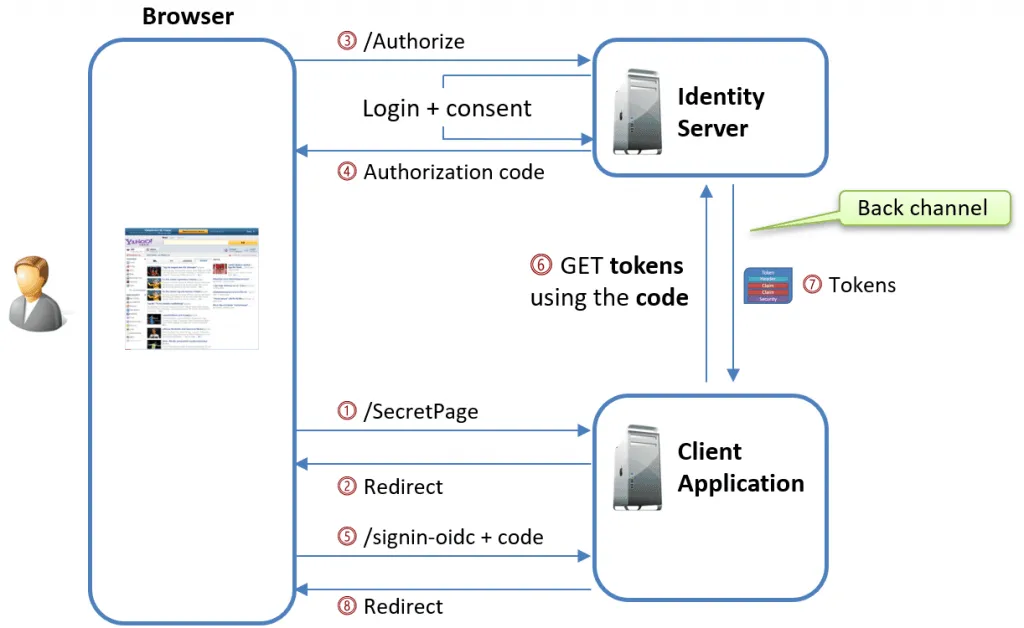
In ASP.NET Core, the OpenID Connect handler does the client side for you: it redirects the user to the provider, receives the authorization code, swaps it for tokens over a back channel, and hands the user over to the cookie handler.
OAuth 2.0 vs OpenID Connect
OAuth 2.0 is about access: it lets an application get an access token to call an API, without handling the user's password. It does not tell the application who the user is. OpenID Connect builds on OAuth 2.0 and adds that part: the ID token, standard claims about the user, the UserInfo endpoint and a discovery document. In practice you use both together. OpenID Connect signs the user in, and the OAuth 2.0 access token protects your APIs.
The guide on tn-data.se covers the differences in more detail, together with the OAuth versions, the grants and the flows.
What Goes Wrong in Practice
The protocol is the same everywhere, but most of the problems I see are in the client and the API. They come up in questions from developers, in my workshops and in client projects:
- The login is a black box. The OpenID Connect handler does many steps for you, so when the login fails, you don't know which step failed. Watching the traffic in Fiddler is often the fastest way to find out.
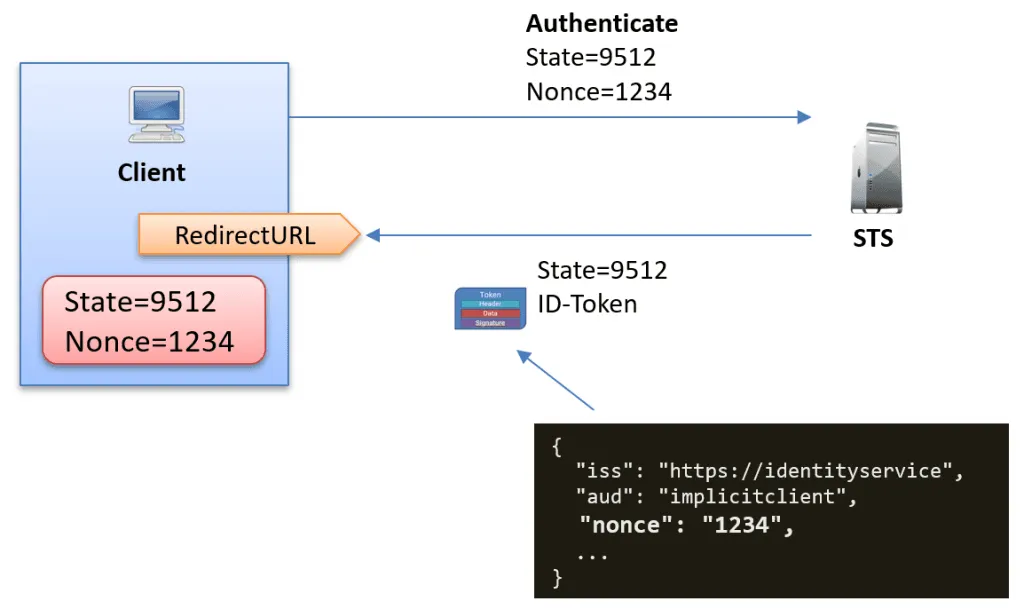
- State and nonce are a mystery. The
stateparameter protects the callback against cross-site request forgery, and in ASP.NET Core it also carries your encryptedAuthenticationProperties. Thenonceties the ID token to the login that asked for it, and it is kept in a cookie until the user comes back. - The browser blocks the login cookies. The nonce cookie must survive the round trip to the provider. Over plain HTTP, or with the wrong
SameSitesetting, the browser drops them and the login fails. - Claims go missing on the way in. The provider sends the claim in the ID token or from the UserInfo endpoint, and then the handler's claim actions and claim mapping drop it or rename it before it reaches your
Userobject. - The ID token and the access token get mixed up. The ID token is for your client application. The access token is for your API, and the API validates it with the JwtBearer handler.
- Sensitive parameters travel in the URL. A normal authorization request puts its parameters in the browser's address bar. Pushed Authorization Requests (PAR) send them over the back channel instead.
- Tokens end up in the browser. For single-page apps, I recommend the BFF pattern, so tokens stay on the server.
If you use Duende IdentityServer as your provider, my IdentityServer page covers the server side.
Start Here
If OpenID Connect itself is new to you, read my OpenID Connect for Developers guide first. The posts below are much easier to follow when you know what tokens, scopes, claims and flows are.
1. Understand the login in ASP.NET Core
- Demystifying OpenID Connect's State and Nonce Parameters in ASP.NET Core: what is inside these two parameters and what they protect against.
- Debugging cookie problems in ASP.NET Core: the cookies involved in an OpenID Connect login, and why the browser sometimes rejects them.
- Exploring what is inside the ASP.NET Core cookies: what ends up in the authentication cookie after the login.
2. Get the claims you expect
- Debugging OpenID Connect Claim Problems in ASP.NET Core: the ID token, UserInfo, claim actions, claim mapping and the name and role claims.
3. Make the authorization request safer
- Pushed Authorization Requests (PAR) in ASP.NET Core 9: what PAR is, why it makes sign-in safer, and how to use it with Duende IdentityServer.
- AdditionalAuthorizationParameters in ASP.NET Core 9: add custom parameters to the authorization request without workarounds, also with PAR.
4. Protect your APIs with access tokens
- Troubleshooting JwtBearer authentication issues in ASP.NET Core: 401 or 403 from your API, and how to find out why.
- Debugging JwtBearer Claim Problems in ASP.NET Core: missing or renamed claims in the access token on the API side.
5. Keep tokens out of the browser (BFF)
- Implementing BFF Pattern in ASP.NET Core for SPAs: why OpenID Connect tokens in a single-page app are a risk. Part 1 of a seven-part series.
- BFF in ASP.NET Core #5 - Automatic Token Renewal: refresh tokens in a BFF, so users stay signed in.
Frequently Asked Questions
What does OIDC stand for?
OIDC is short for OpenID Connect. It is the identity layer on top of OAuth 2.0 that most modern sign-in solutions use, and the two names mean the same thing.
What are the state and nonce parameters for?
The state parameter protects the callback from the identity provider against cross-site request forgery. The nonce ends up inside the ID token, so the client can check that the token was issued for its own login request and not injected by someone else. In ASP.NET Core, the OpenID Connect handler creates and checks both for you. My post Demystifying OpenID Connect's State and Nonce Parameters shows what is inside them.
Why is a claim missing after an OpenID Connect login in ASP.NET Core?
First check that the provider sends it, in the ID token or from the UserInfo endpoint. If it does, the OpenID Connect handler is dropping or renaming it: by default its claim actions delete a list of protocol claims and keep only some, and claim mapping renames others. I go through each step in Debugging OpenID Connect Claim Problems in ASP.NET Core.
What is Pushed Authorization Requests (PAR)?
PAR is an OAuth standard where the client sends the authorization parameters to the identity provider over a back-channel request first, and then redirects the browser with only a short reference. The parameters stay out of the URL and can't be changed on the way. ASP.NET Core 9 supports PAR in its OpenID Connect handler. See Pushed Authorization Requests (PAR) in ASP.NET Core 9.
How do I add custom parameters to the authorization request in ASP.NET Core?
From ASP.NET Core 9, add them to AdditionalAuthorizationParameters in the OpenID Connect options. Before that, you needed workarounds such as the OnRedirectToIdentityProvider event. See AdditionalAuthorizationParameters in ASP.NET Core 9.
Should I learn OpenID Connect or IdentityServer first?
OpenID Connect. The protocol is the same whether your provider is IdentityServer, Entra ID or Keycloak, and once you know what goes over the wire, every provider gets easier. Then see my IdentityServer page.
Want to Go Further?
For the protocol itself, start with my free OpenID Connect for Developers guide on tn-data.se.

My Dometrain course Getting Started: OpenID Connect covers OAuth 2 and OpenID Connect at the protocol level: tokens, signing, scopes, claims and the flows. It is not tied to .NET, so it works whatever language your applications use. For the ASP.NET Core side (the authentication middleware, cookies and authorization), see Getting Started: Authentication and Authorization in .NET.
If your team needs help with OpenID Connect in ASP.NET Core, you can hire me.