The BFF Pattern: What It Is and Where to Start
The BFF pattern is one of the most important security patterns for modern single-page applications. It keeps access tokens out of the browser, where an XSS attack or a malicious extension can steal them, and the OAuth working group recommends it in its guidance for browser-based apps. This page explains the pattern, lists my seven-part series on it in reading order and answers the questions I get most often.
What Is the BFF Pattern?
The Backend for Frontend (BFF) pattern moves authentication out of the browser. A small server-side component, the BFF, runs the OpenID Connect login, keeps the access and refresh tokens on the server, and gives the browser only an HttpOnly session cookie. When the single-page app needs data, it calls the BFF with that cookie, and the BFF adds the access token and forwards the call to the API.
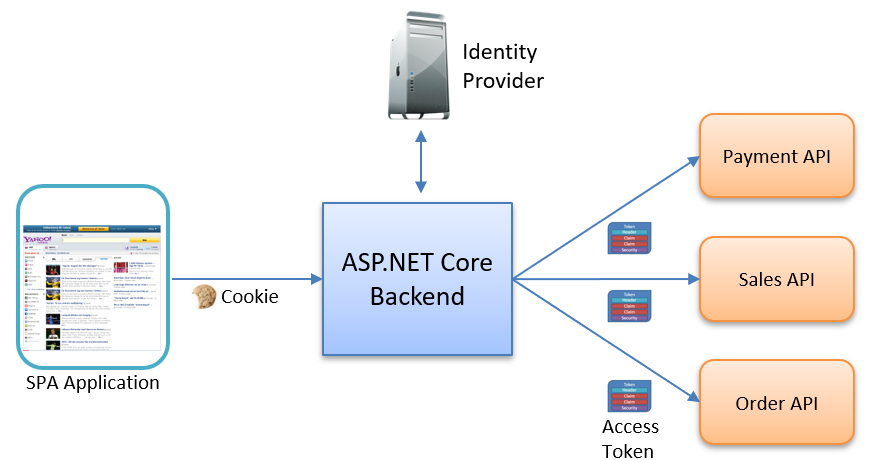
The BFF is a confidential client to the identity provider, so it can keep a client secret and handle the full OpenID Connect flow. Inside, a typical BFF has two parts: session management (login, logout, the session cookie and the stored tokens) and an API proxy that swaps the cookie for an access token on the way to your APIs.
The name comes from the microservices world, where a BFF was a backend tailored to one kind of client, such as a mobile app or a web app. Using it for security is the same idea: a backend tailored to the security needs of a browser app. The IETF draft OAuth 2.0 for Browser-Based Apps says this architecture is "strongly recommended for business applications, sensitive applications, and applications that handle personal data."
Why Tokens in the Browser Are a Risk
The common alternative is to run OpenID Connect directly in the SPA. A JavaScript library logs the user in, stores the tokens in the browser and sends the access token to each API.
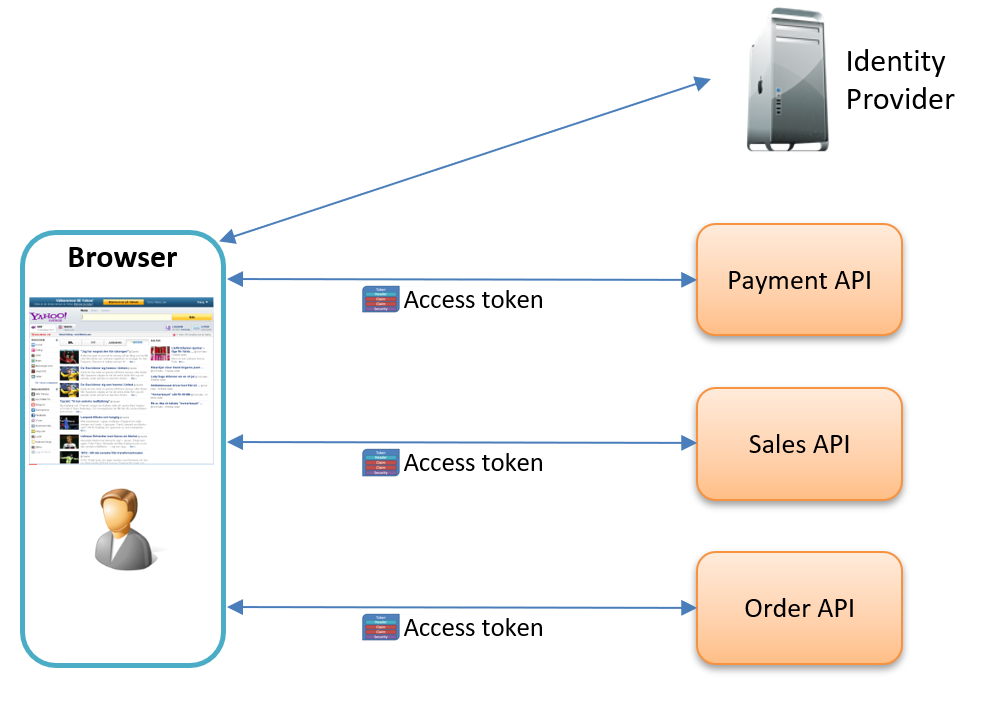
It looks simple, but it has real problems:
- Tokens in the browser can be stolen through cross-site scripting (XSS), a malicious third-party script or a compromised browser extension. Anything in
localStorageis readable by any script on the page. - A stolen access token works from anywhere. The attacker can call your APIs from their own machine, with their own tools, until the token expires. A stolen refresh token is worse: they can keep getting new access tokens for weeks or months, until it is revoked or expires.
- The SPA can't use the browser's own protections for its credentials, such as HttpOnly and SameSite cookies, because the tokens live in JavaScript.
- Token flows, renewal, error handling and logout all end up as security-critical code in the frontend. And if you search npm for "oidc", you get thousands of libraries, but only a few are certified by the OpenID Foundation.
With a BFF, there are no tokens in the browser to steal. The browser holds one session cookie that JavaScript can't read.
Why I Wrote the Series
In my work I regularly meet teams that run OpenID Connect directly in their single-page apps. I wanted to understand the BFF pattern properly, and reading about it only gets you so far, so I built one from scratch. I also needed a complete, working example for the security workshops I run with development teams. The result is the series below, with all the source code on GitHub.
What Goes Wrong in Practice
Moving to a BFF removes the tokens from the browser, but the session cookie now carries the user's identity, so the risk moves there. These are the mistakes I cover in the series:
- The session cookie keeps its defaults. It needs HTTPS,
HttpOnly,Secure, aSameSitevalue and ideally the__Host-prefix. Without the prefix, the cookie is shared across the whole site, so a taken-over subdomain such astest.api.example.comcan get it. - "The request failed, so we're safe." CORS stops the page from reading the response, but a simple cross-origin request still reaches your BFF, cookies included. The fix is to require a custom header such as
X-CSRFon every API call, which forces a preflight, and to reject calls without it on the server. - Users get logged out when the access token expires. Tokens can live for ten minutes or for a day, and ASP.NET Core has no built-in way to use the refresh token. Writing your own renewal brings race conditions and storage conflicts, so I use the Duende.AccessTokenManagement library.
- Testing on
localhosthides problems. Browsers treatlocalhostas trustworthy, so some things work there over plain HTTP that fail on a real domain. I test with names likelocaltest.meand real certificates from mkcert. - The BFF runs on more than one instance. Then the tokens and session data need shared storage, and the Data Protection key ring must be persisted, or sessions break and refresh tokens collide.
- The cookie grows too big. Storing tokens in the authentication cookie makes it large. A server-side session store keeps it small.
Most of this comes down to knowing what actually goes over the wire. I use Fiddler a lot, and several posts in the series show the real HTTP traffic.
Start Here
If OpenID Connect itself is new to you, read my OpenID Connect for Developers guide on tn-data.se first. The BFF runs the OpenID Connect flow for you, and it is much easier to follow when you know what tokens, scopes and flows are.
The BFF in ASP.NET Core series
Seven parts, each building on the one before. Read them in order.
- Part 1: Introduction: why OpenID Connect directly in the SPA is a risk, and what a stolen token lets an attacker do.
- Part 2: The BFF Pattern Explained: what a BFF is, where the pattern comes from, and the two parts inside it.
- Part 3: Securing the Session Cookie: HTTPS,
HttpOnly,Secure,SameSite, the__Host-prefix and security headers. - Part 4: Implementing a BFF from Scratch: login, logout and session endpoints, OpenID Connect, and a proxy for remote APIs.
- Part 5: Automatic Token Renewal: refresh tokens and Duende.AccessTokenManagement, so users stay signed in.
- Part 6: Securing the BFF with CORS: the evil-twin attack, simple and preflight requests, and a required
X-CSRFheader. - Part 7: Introducing the Duende BFF Library: replacing the hand-built BFF with Duende's library, and what the series did not cover.
Related posts
The BFF stands or falls with its session cookie, and ASP.NET Core protects that cookie with the Data Protection API. These posts go deeper on both.
- Debugging cookie problems in ASP.NET Core: cookies the browser rejects or doesn't send, and the SameSite rules behind them.
- Exploring what is inside the ASP.NET Core cookies: what the authentication cookie contains and how it is protected.
- Improving ASP.NET Core Security By Putting Your Cookies On A Diet: a session store that keeps the cookie small, so a stolen cookie can't be reused after sign-out.
- Persisting the ASP.NET Core Data Protection Key Ring in Azure Key Vault: keep sessions working across restarts and instances.
- Introducing the Data Protection API Key Ring Debugger: a small tool I wrote to look inside the key ring.
- Configuring ASP.NET Core Forwarded Headers Middleware: needed when your BFF runs behind a reverse proxy or a load balancer that ends HTTPS.
Frequently Asked Questions
Should I use a BFF or store the tokens in the SPA?
For business applications, use a BFF. Tokens in localStorage or sessionStorage can be read by any script on the page, and a stolen token works from anywhere until it expires. With a BFF, the browser only has an HttpOnly session cookie that JavaScript can't read. The IETF draft on browser-based apps strongly recommends this for business and sensitive applications and for apps that handle personal data.
Do I need the Duende BFF library?
No. In parts 4 to 6 I build a working BFF with plain ASP.NET Core and the Duende.AccessTokenManagement library. The Duende BFF Security Framework gives you the management endpoints, CSRF protection, a YARP-based API proxy, back-channel logout and Blazor support out of the box. Part 7 shows the move, and it took only a few changes. Check Duende's site for the current licensing. OidcProxy.Net is another option, built on YARP.
Does the BFF pattern work with React, Angular or Blazor?
Yes. The frontend framework doesn't matter: React, Angular, Blazor or plain JavaScript (my demo app uses jQuery). The SPA calls the BFF with the session cookie and never touches a token. It is simplest when the BFF serves the SPA from the same origin, because then the cookie and CORS rules stay strict.
How does automatic token renewal work in a BFF?
At login, the BFF asks for the offline_access scope and gets a refresh token along with the access token. Before the access token expires, the BFF uses the refresh token to get a new one. With Duende.AccessTokenManagement you set how early it refreshes, and the browser never notices. With rotating refresh tokens, each renewal also returns a new refresh token. I show it step by step in part 5.
Doesn't the BFF add latency?
Very little. The browser keeps one HTTP/2 connection to the BFF, and one extra hop is small next to the database calls most API requests make anyway. The BFF can also cache data. In return, your internal APIs stay hidden and only the BFF has to face the internet.
How do I protect a BFF against CSRF?
Use layers. Set SameSite on the session cookie. Require a custom header, such as X-CSRF, on every API call: it forces the browser to send a CORS preflight, and HTML forms can't set it. Then allow only your own origins in the CORS policy. Part 6 walks through it.
Want to Go Further?
For the protocol itself, start with my free OpenID Connect for Developers guide on tn-data.se. If your identity provider is Duende IdentityServer, my IdentityServer page lists my posts on it in reading order.
Both of my Dometrain courses cover a side of the BFF. Getting Started: OpenID Connect is about the protocol the BFF speaks to your identity provider: OAuth 2 and OpenID Connect, the tokens, signing, scopes, claims and the flows. Getting Started: Authentication and Authorization in .NET is about the ASP.NET Core side, where the session lives: the authentication middleware, the cookie handler, cookie and ticket lifetimes, and data protection.
I also give a talk on the pattern for companies, A Tokenless SPA: Secure Authentication with the BFF Pattern, with live ASP.NET Core code.
If your team wants to move tokens out of the browser and needs help, you can hire me.