I use Claude Code every day, and I want to know what it actually does. This page collects my posts on agentic development in reading order, and answers the questions I hear most often when I give my talk on coding agents.
What Is Agentic Development?
In agentic development, an AI agent works inside your development environment. It can read your files, search the codebase, run commands, edit code and check its own changes. It works in a loop: the model decides what to do next, the agent runs a tool, the result goes back to the model, and this repeats until the task is done.
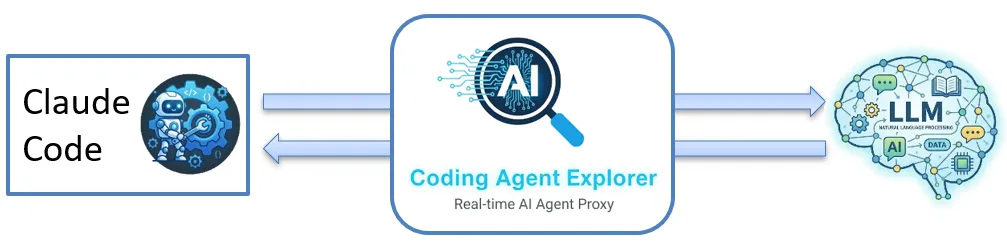
A coding agent such as Claude Code is the program that runs that loop. The language model only produces text. The agent turns that text into tool calls (Read, Write, Bash, Grep and others) and sends the results back. Tools and MCP servers are what give a text-only model access to your code.
The Agentic Loop
At its core, the agentic loop is very simple: it is just a while loop. This is the main loop of a coding agent, from my talk:
// ========== THE AGENTIC LOOP ==========

while (true)
{
    var input = GetUserInput();

    var response = await agent.SendMessage(input);

    // Does the model want to use a tool?
    while (agent.WantsToUseTool(response))
        response = await agent.ProcessToolCalls(response);
}
That's it! The inner loop does the work: as long as the model asks for a tool, the agent runs it and sends the result back.
Why I Look Under the Hood
For most developers, a coding agent is a black box: you type a prompt, something happens, and code appears. As a trainer, I build tools that help people get a solid mental model of how things work, as I did with the Cloud Debugger for Azure. So I built the Coding Agent Explorer, an open-source .NET proxy and dashboard that shows every request Claude Code sends to the model and every response it gets back. I built it with Claude Code.
I often say: "The things you're scared of, you should do more often." If coding agents feel like magic, that is exactly why it pays to look inside. My talk How Coding Agents Actually Work: Tools, MCP, and the Agent Loop comes from the same idea, and I have given it more than ten times. You can watch it from Jfokus on YouTube.
What Goes Wrong in Practice
These are the things I see people miss when they start working with coding agents:
- The agent is treated as a black box. You don't see which files it read, which tools it called, or why it seems to "think" for a while. Once you can see the conversation, you write better prompts and catch mistakes earlier.
- Token costs stay invisible. The system prompt and the tool definitions take up far more tokens than most people expect. Once you see the cache creation and cache read tokens, you can also see what prompt caching saves.
- A hook meant to block something doesn't block it. Exit code 1, the usual "something failed" code, does not block the action. To enforce a rule, a hook must exit with code 2, or return a JSON decision.
- Hooks are used as the security boundary. A
PreToolUsehook can block a direct read of a secret file, but an agent with shell access can still write a script that reads it. Hooks are a guardrail and an audit log. For real protection, add a sandbox, limited file permissions and allowlists. - MCP servers are trusted blindly. You register a server and something useful happens, but you don't know which tools it exposes, what the agent asks it, or whether its tool descriptions are clear enough for the model.
Start Here
The three posts below are a series. Read them in order.
1. See what a coding agent sends and receives
- Introducing the Coding Agent Explorer (.NET): set up the proxy in a few minutes and watch every request between Claude Code and the model: system prompts, tool calls, token counts and timing.
2. Observe and control the agent with hooks
- Exploring Claude Code Hooks with the Coding Agent Explorer (.NET): what Claude Code hooks are, how a
PreToolUsehook blocks access to a secret file, why exit codes matter, and how to watch every hook event live.
3. Look inside MCP traffic
- Visualizing Claude Code MCP Requests with Coding Agent Explorer: the MCP Observer sits between Claude Code and an HTTP MCP server and shows each JSON-RPC call, such as
tools/listandtools/call.
Frequently Asked Questions
How does Claude Code work under the hood?
Claude Code sends your prompt to the model together with a long system prompt and the definitions of its tools. The model answers with text or with tool calls, such as reading a file or running a command. Claude Code runs the tools and sends the results back, and the loop goes on until the task is done. The Coding Agent Explorer lets you watch each turn.
How can I see what Claude Code sends to the API?
Run the Coding Agent Explorer and point Claude Code at its proxy by setting the environment variable ANTHROPIC_BASE_URL to http://localhost:8888. Every request and response then shows up in the dashboard. The proxy only listens on localhost, API keys are removed from the stored data, and nothing is written to disk.
What are Claude Code hooks?
A hook is a shell command that Claude Code runs when something happens, for example before a tool runs (PreToolUse), after it has run (PostToolUse) or when you submit a prompt. Claude Code sends a JSON description of the event to the command on standard input. The exit code decides what happens next: 0 lets the action go ahead, and 2 blocks it.
Can a Claude Code hook stop the agent from reading secret files?
Only partly. A PreToolUse hook can block direct tool calls, such as reading secret.key. It is not a sandbox: with shell access, the model can read the file in other ways. For strong guarantees, run the agent in a container or VM, limit the file system, restrict the shell and use allowlists.
What is MCP (Model Context Protocol)?
MCP is an open standard that lets AI agents connect to external tools and data sources. An MCP server exposes tools that the agent can discover and call. The protocol is built on JSON-RPC 2.0, with messages such as initialize, tools/list and tools/call, and it runs over HTTP or over STDIO.
Does the Coding Agent Explorer work with other coding agents?
Not yet. Today it supports Claude Code with the Anthropic API. Support for other agents is on the roadmap, and you can ask for one in the GitHub issues.
Want to Go Further?
The Coding Agent Explorer is open source, on GitHub. Bug reports, ideas and pull requests are welcome.
My talk How Coding Agents Actually Work: Tools, MCP, and the Agent Loop opens the black box: how an agent talks to the model, how tools and MCP give it access to your code, and how the agent loop ties it together. I give it at companies, meetups and conferences.
If your team wants to start using coding agents in real projects, you can hire me.