What's new in ASP.NET Core authentication in .NET 11
Whenever a new version of .NET arrives, I want to know what has changed in authentication and authorization. As a consultant and trainer working with ASP.NET Core, I need to know what those changes mean for the applications I build and the workshops I teach.
I also wanted to check the smaller updates, since they can include more than bug fixes. I compared:
- .NET 10.0.1 to 10.0.13: the changes in the .NET 10 servicing updates.
- .NET 11 RC2: the additional changes in the next major version.
A fix in .NET 11 may already have shipped in a .NET 10 update, so I checked both release lines to see what is actually new. .NET 11 is not released yet, so everything I say about it is based on RC2. Details can still change before the final release.
I focused on the ASP.NET Core authentication handlers, authorization, and Data Protection. These are the libraries I work with the most in my training workshops.
Here is the short version of what I found:
- Cookie authentication: a fresh session key when you sign out and back in with a session store (.NET 11 RC2), and stricter return-URL validation (already in .NET 10.0.13).
- Negotiate (Windows Authentication): TLS channel binding (.NET 11 RC2), and LDAP lookup fixes that can change a user’s roles (already in .NET 10.0.13).
- Certificate authentication: the validation cache now keeps results separate per scheme (already in .NET 10.0.13).
- Authorization: a new
AuthorizationPolicy.CombineAsyncoverload that builds a policy from endpoint metadata, and failure reasons in the logs (.NET 11 RC2). - Data Protection: new buffer-based APIs (.NET 11 RC2), and a key-ring startup fix (already in .NET 10.0.13).
- OpenID Connect, JwtBearer, BearerToken and the other handlers: no new public APIs.
- Device Bound Sessions: shipped as an experimental package in RC1, then removed again before RC2.
How I compared the versions
I usually go straight to the source code. The release notes give me a starting point. Comparing the implementations and public APIs helps me see which behaviors have changed, what developers can now do, and what has stayed the same.
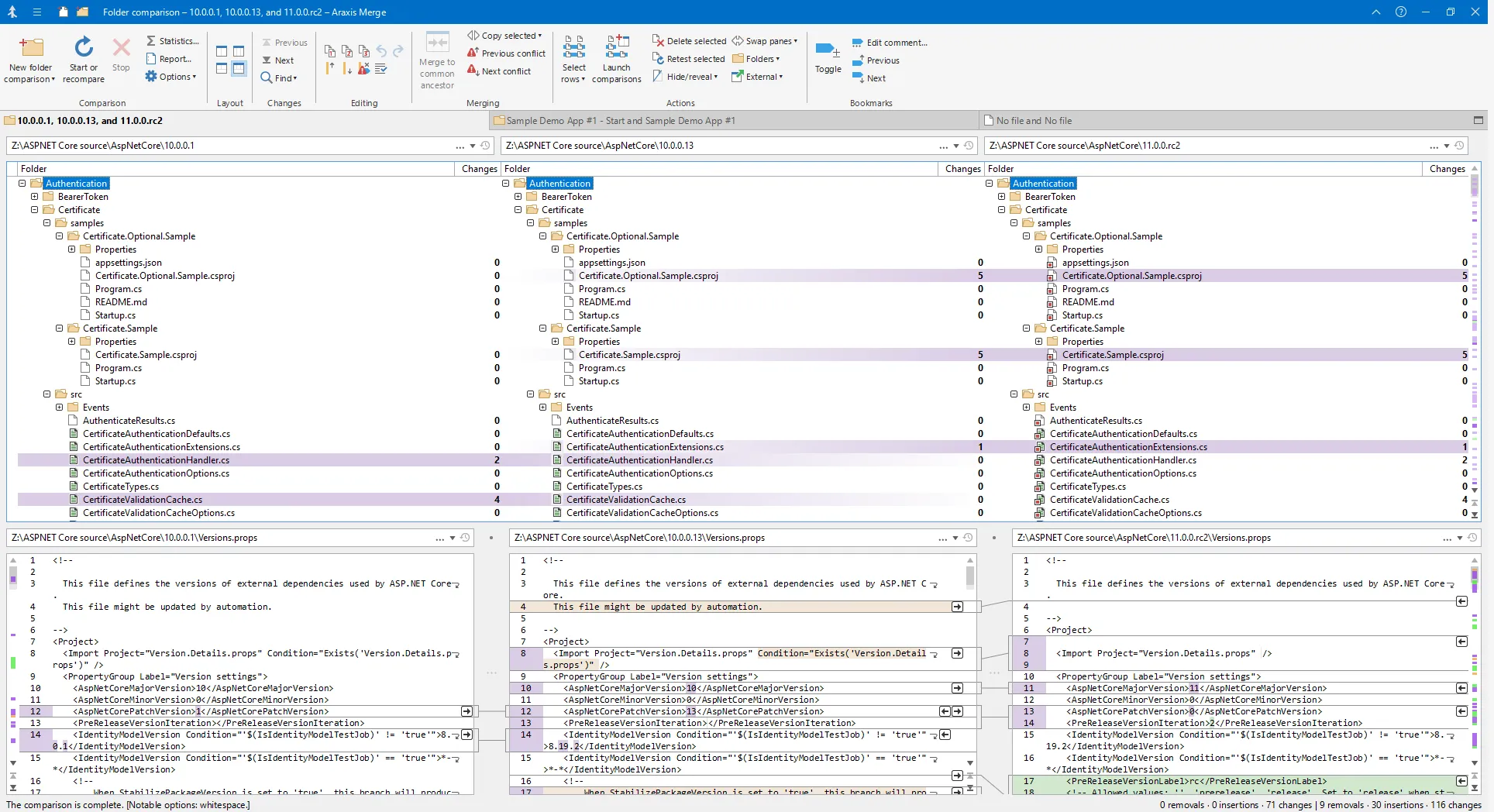
For this comparison, I used Araxis Merge, my favorite diff tool. It makes it easy to compare all three versions side by side. I used the same approach a few years ago when I looked at what was new in the JwtBearer library in ASP.NET Core 6.
ASP.NET Core authentication handlers
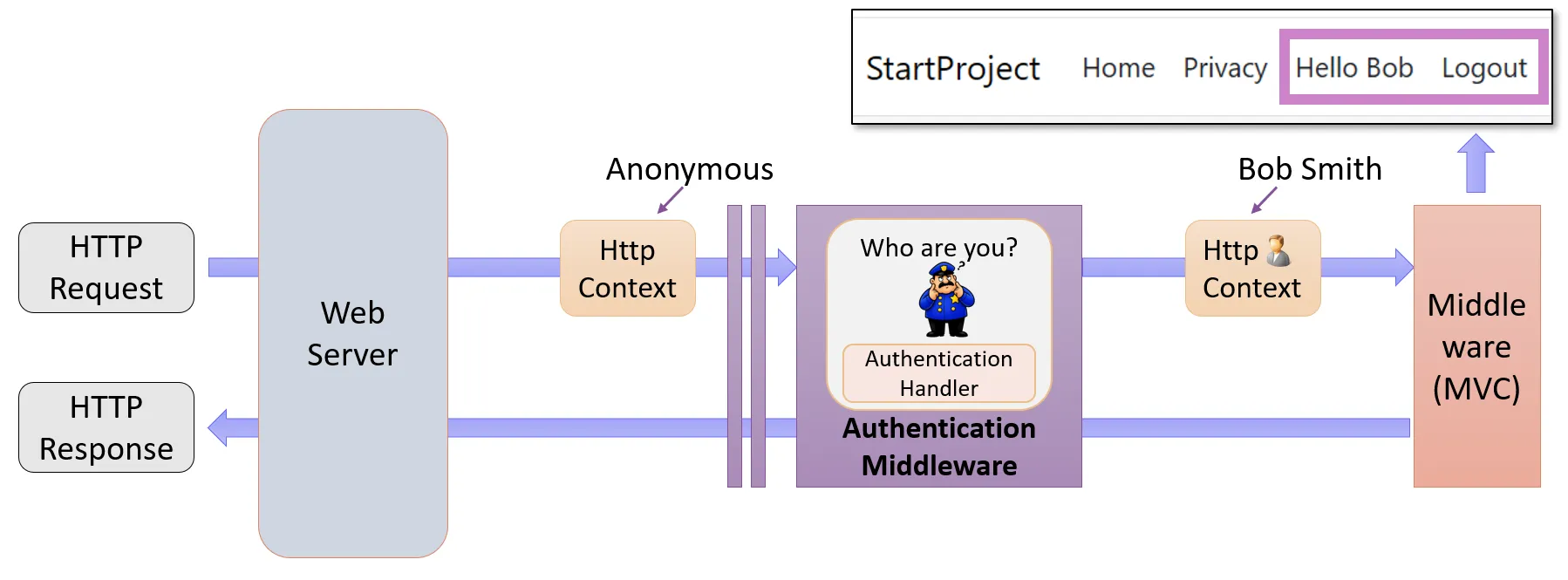
The authentication middleware identifies the user making an incoming request. It delegates the authentication work to handlers, each supporting a particular authentication method. When authentication succeeds, the middleware sets HttpContext.User. The rest of the request pipeline can then access the user’s identity and claims.
Different handlers support different ways of authenticating. For example, the cookie handler reads a protected authentication cookie, while the JwtBearer handler validates a bearer token. The OpenID Connect handler handles the sign-in flow with an identity provider, typically working alongside a cookie handler that authenticates subsequent requests.
I’ll start with cookie authentication.
Cookie authentication: small fixes, no major changes
The cookie authentication handler has two fixes worth a closer look. There are no major changes and no changes to its public API.
I cover the cookie handler in more detail in Exploring what is inside the ASP.NET Core cookies and Debugging cookie problems in ASP.NET Core.
A fresh session key after signing out and back in
If you use an ITicketStore (set through CookieAuthenticationOptions.SessionStore), signing out and immediately signing in again during the same HTTP request now creates a new stored session. Previously, the cookie handler tried to renew the session using the key that sign-out had just removed.
For example, a controller might use this sequence when replacing the current user’s principal. Like all the code samples in this post, it is a simplified illustration of the idea, not complete, tested code.
private async Task UpdateUserAsync(ClaimsPrincipal newUserDetails)
{
    await HttpContext.SignOutAsync("cookie");
    await HttpContext.SignInAsync("cookie", newUserDetails);
}
The example assumes that the request already carries a session cookie. The scheme name “cookie” refers to the registered cookie authentication scheme.
For more details about SessionStore and ITicketStore, see my blog post Improving ASP.NET Core Security By Putting Your Cookies On A Diet.
The fix appears in .NET 11 RC2. Applications without an ITicketStore, or where sign-out and sign-in happen in separate requests, are not affected.
See Cookie session ID cannot be regenerated when using a custom ticket store and the implementation PR for the background.
Stricter return-URL validation
During sign-in and sign-out, the handler now rejects certain non-printing characters in the query-string ReturnUrl. Normal local return URLs continue to work. For example:
/Account/Login?ReturnUrl=%2FdashboardThis hardening is already present in .NET 10.0.13 and is kept in .NET 11 RC2. See PR #66876: Reject ASCII control characters in cookie auth return URLs for the background, and the return-URL validation helper for the checks it performs.
OpenID Connect: no new public APIs
The OpenID Connect handler has no major new features.
A compatibility fix in .NET 11 RC2 prevents the framework’s CSRF protection from interfering with authentication callbacks. See PR #68669 for the background.
To learn more about the internals of the OpenID Connect handler, see my blog posts Debugging OpenID Connect Claim Problems in ASP.NET Core and Demystifying OpenID Connect’s State and Nonce Parameters in ASP.NET Core. All my OpenID Connect posts are collected on my OpenID Connect page.
JwtBearer: no changes to highlight in the handler
The JwtBearer handler has no noteworthy changes.
I only reviewed the ASP.NET Core handler here. Token validation also depends on IdentityModel, and I haven’t covered its changes.
To learn more about this handler, see my blog posts Debugging JwtBearer Claim Problems in ASP.NET Core and Troubleshooting JwtBearer authentication issues in ASP.NET Core.
BearerToken: no noteworthy changes
The BearerToken handler issues and validates protected bearer tokens for clients such as single-page applications (SPAs). These tokens use ASP.NET Core Data Protection. They have their own format, separate from JWTs, and offer a simpler option for first-party applications that need bearer tokens without a full OAuth or OpenID Connect solution.
The handler has no noteworthy changes across the versions compared here.
To learn more about this handler, see my blog post BearerToken: The new Authentication handler in ASP.NET Core 8.
Negotiate: TLS channel binding and LDAP roles
The Negotiate handler supports Windows Authentication using Kerberos or NTLM. It is commonly used in corporate intranet applications, where users sign in with their existing domain accounts. See Microsoft’s Windows Authentication documentation for more details.
Binding authentication to the TLS endpoint
In .NET 11 RC2, the Negotiate handler uses TLS channel binding when available. This ties the authentication exchange to the server’s TLS endpoint, using information derived from its certificate. When the authentication mechanism checks it, this can help detect authentication that was relayed to a different endpoint.
See PR #68317 for the background.
LDAP changes can affect the roles a user receives
.NET 10.0.13 includes fixes to the LDAP account and group lookups used by Negotiate, and they are kept in .NET 11 RC2. If your application uses LDAP-derived roles, these changes can affect which roles an authenticated user receives.
Certificate authentication: a small cache fix
The certificate authentication handler validates a client certificate and uses it to establish the client’s identity. See Microsoft’s certificate authentication documentation for more details.
Certificate authentication has no new public API, but a fix already present in .NET 10.0.13 matters if you enable validation caching and register multiple named certificate schemes.
The built-in cache now includes the authentication scheme name alongside the certificate hash in its cache key. This keeps cached results separate for schemes with different validation settings or different resulting principals. The fix is kept in .NET 11 RC2 and needs no new configuration in the normal handler path.
See PR #66673: Include scheme in certificate cache for Authentication middleware for the fix.
Other authentication handlers
The Facebook, Google, MicrosoftAccount, Twitter, and WsFederation handler modules have no major implementation or public API changes to highlight across the versions compared here.
I also found no public API changes or significant standalone behavior changes in the HTTP authentication abstractions and services. This review covers those modules themselves. Shared handler behavior and changes in dependencies need to be considered separately.
Authorization: combining metadata into a policy
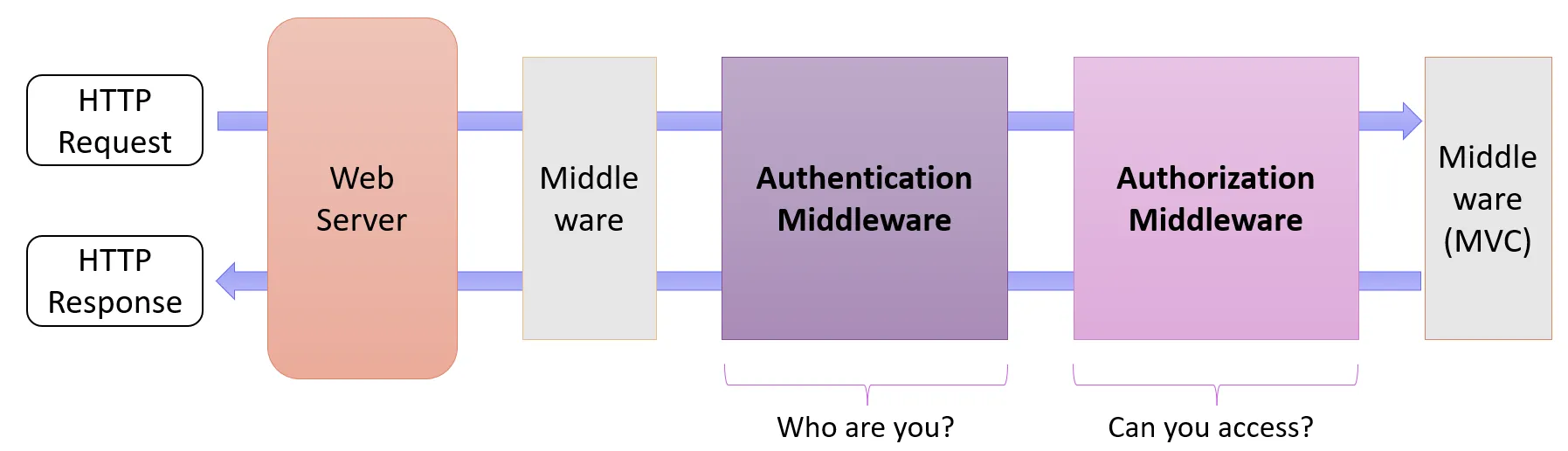
Authentication establishes who the user is. Authorization determines what that user is allowed to do. In ASP.NET Core, a separate authorization middleware runs after authentication and uses that identity to evaluate access.
In .NET 11 RC2, there is a new overload of AuthorizationPolicy.CombineAsync that builds a combined policy directly from an endpoint’s metadata:
var policy = await AuthorizationPolicy.CombineAsync(
    policyProvider, endpoint.Metadata);
It combines authorization attributes such as [Authorize], explicitly supplied policies, and requirements supplied through IAuthorizationRequirementData. If you’re building a custom authorization integration, this lets you assemble a policy using the framework’s rules. You still need to check whether the current user meets the policy’s requirements.
According to PR #67765, the change makes authorization metadata handling more consistent across MVC, SignalR, and Blazor.
More useful authorization failure logs
When an authorization handler explicitly fails authorization, the logs now include the reason it supplies. For example, a custom handler evaluating an authorization requirement might call:
context.Fail(new AuthorizationFailureReason(this, "Account is suspended."));Providing a failure reason was already possible. .NET 11 RC2 makes that message visible in the authorization failure log. It does not add the message to the HTTP response.
Data Protection: buffer APIs and a key-ring fix
ASP.NET Core Data Protection protects data used by features such as authentication cookies and OpenID Connect state. I found two changes worth covering: new buffer APIs in .NET 11, and a key-ring reliability fix that has already shipped in a .NET 10 update.
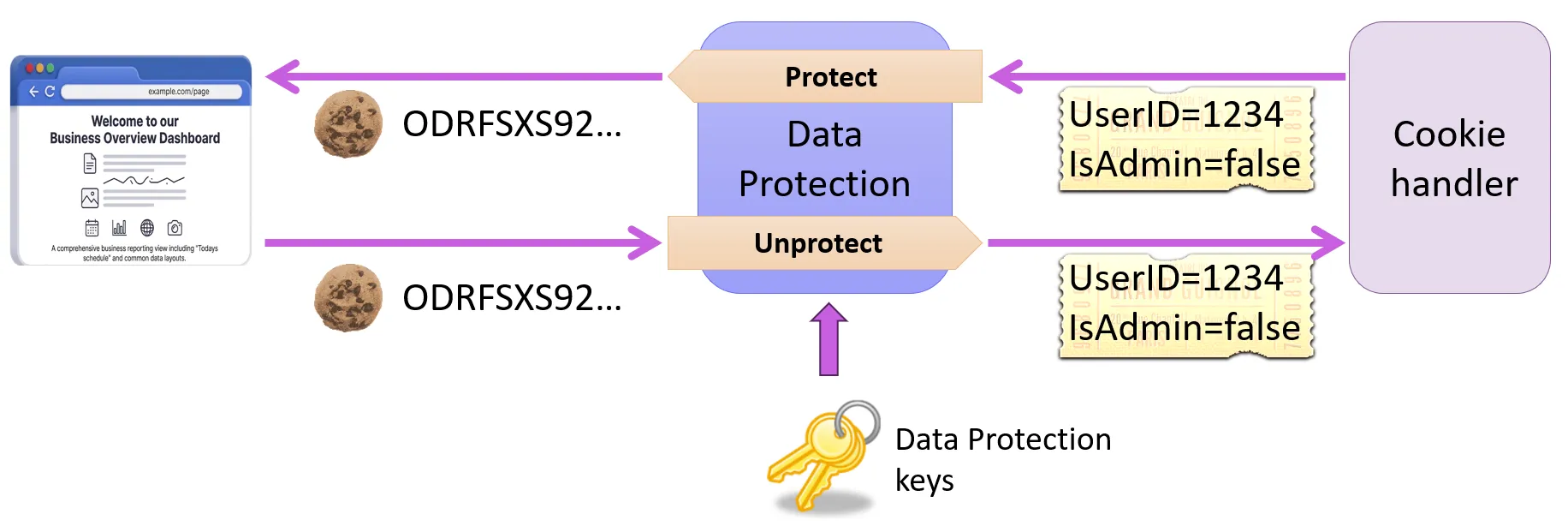
The cookie authentication handler uses Data Protection to encrypt the authentication ticket and protect it against tampering before storing it in a cookie. When the browser sends the cookie back, the handler uses Data Protection to recover the ticket and verify its integrity, using keys managed in the application’s key ring.
Protecting data directly into a buffer
The existing IDataProtector byte-array methods return a new array containing the result. In .NET 11 RC2, the new ISpanDataProtector interface lets callers supply a ReadOnlySpan<byte> as input and write the result into an IBufferWriter<byte>.
If your library or application already works with buffers, this can help you avoid intermediate arrays and copies. Given an IDataProtectionProvider, you can use the new API like this:
using System.Buffers;
using Microsoft.AspNetCore.DataProtection;

IDataProtector protector = provider.CreateProtector("Example");

if (protector is ISpanDataProtector spanProtector)
{
    var output = new ArrayBufferWriter<byte>();
    spanProtector.Protect("hello"u8, ref output);

    // output.WrittenSpan contains the protected payload.
}
The interface also provides an Unprotect method that works the same way, with a buffer writer. The existing APIs remain available, and custom IDataProtector implementations do not have to implement the new interface.
See PR #64262: Spanify DataProtector with IBufferWriter<byte> and the original API proposal for the background.
More reliable key-ring initialization
A fix already present in .NET 10.0.13 addresses a concurrency issue during key-ring initialization. The issue could cause thread-pool starvation and delay requests that need Data Protection.
The fix improves reliability for applications using Data Protection, including the authentication features that depend on it. It is also present in .NET 11 RC2. See the reported startup problem and the initial fix for the background.
For more about Data Protection and its key ring, see my blog posts:
- Introducing the Data Protection API Key Ring Debugger
- Persisting the ASP.NET Core Data Protection Key Ring in Azure Key Vault
What happened to Device Bound Sessions?
One major feature that was planned for .NET 11 was support for Device Bound Session Credentials (DBSC). It shipped as an experimental package in .NET 11 RC1, but it was pulled again before RC2. It may come back in a later release.
Device Bound Session Credentials is a draft specification that binds the refresh of a browser session to a private key held by the browser on the user’s device. The application issues a short-lived session cookie, and to refresh it, the browser must prove that it holds the private key. Chrome keeps the key in secure hardware, such as a Trusted Platform Module (TPM), when it is available. See Chrome’s DBSC documentation for how the browser side works.
It addresses a well-known weakness of long-lived authentication cookies: if someone steals the cookie, they can hijack the session. With DBSC, a copied session cookie might still work until it expires, but an attacker without the key on the device can’t use it to extend the session.
In RC1, the experimental Microsoft.AspNetCore.Authentication.DeviceBoundSessions package added a server-side implementation on top of an existing cookie authentication scheme. It managed the registration and refresh endpoints and the short-lived session cookie. The RC1 release notes describe how it worked. For a detailed walkthrough of the protocol and the RC1 package, see Maarten Balliauw’s post Device Bound Session Credentials in ASP.NET Core.
In September 2026, the ASP.NET Core team removed it again. In PR #69462, they explain that the implementation was incomplete, that they were not satisfied with it, and that they want to rework it and possibly get it into .NET 12. The RC2 release notes confirm the removal: if you tried the package in RC1, you need to go back to a supported authentication scheme. The work is tracked in issue #66478.
What I left out
I kept this review to the authentication handlers, authorization and Data Protection. I did not cover ASP.NET Core Identity (including passkeys), IdentityModel, or antiforgery. Each of them deserves its own investigation.
Conclusion
Most of what I found in .NET 10 and .NET 11 was internal refactoring, security hardening, and reliability fixes. There are a few new APIs, but little has changed in how we use authentication, authorization, and Data Protection.
I came away with much the same impression when I reviewed previous .NET versions. ASP.NET Core’s authentication and authorization subsystem is mature and stable, and the work on security and reliability continues.
Keep in mind that my .NET 11 findings come from RC2, and details can still change before the final release.
Reading the source code is still my favorite way to understand authentication in ASP.NET Core. With the debugger, I can follow an incoming request, see which handler runs, and watch how the user’s identity is established. That helps me understand details I don’t get from the documentation alone.
You can find more of my ASP.NET Core posts in the .NET category.
Want to learn more about authentication and OpenID Connect?
I have created two video courses on Dometrain that go deeper into the topics in this post:
- Getting Started: Authentication and Authorization in .NET shows what happens inside ASP.NET Core: the authentication middleware, the cookie handler, Data Protection and authorization. It has more than 12 hours of video.
- Getting Started: OpenID Connect explains OAuth 2 and OpenID Connect at the protocol level, including the ID and access tokens that the OpenID Connect and JwtBearer handlers work with. It is not specific to .NET.


Feedback and comments
Did I miss an interesting authentication, authorization, or Data Protection change in a recent .NET 10 update or in .NET 11? I’d love to hear about it.
If you have feedback, spot a mistake, or find a typo, please let me know through my contact page.