I’m excited to introduce you to the Coding Agent Explorer, a new open-source .NET teaching tool I’ve created that lets you see exactly what happens under the hood when an AI coding agent works on your code.
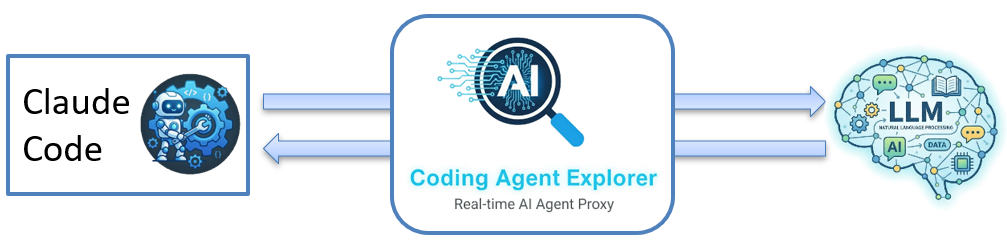
It currently supports Claude Code (with more agents on the roadmap), and it is designed to help developers understand and adopt agentic development. If you’ve ever wondered what’s really going on between your prompts and the code changes that magically appear, this tool lets you see inside the process.
This article is part of a multi-part series on the Coding Agent Explorer, an open-source .NET tool for understanding what AI coding agents do under the hood.
Coding Agent Explorer Series
If you’re new to the tool, start with Part 1. Otherwise, jump to the section that interests you:
- Part 1 – Introducing the Coding Agent Explorer (.NET)
- Part 2 – Exploring Claude Code Hooks with the Coding Agent Explorer
- Part 3 – Visualizing Claude Code MCP Requests with the Coding Agent Explorer (coming soon)
Here’s what you’ll learn:
- Why understanding coding agents matters for every developer
- What the Coding Agent Explorer does and how it works
- How to get started in just a few minutes
- What’s on the roadmap
Let’s dive in!
What Is Agentic Development?
Before we dive into the tool itself, let’s talk about what agentic development means. In traditional AI-assisted coding, you might get autocomplete suggestions or ask a chatbot a question and then copy the answer into your code. But agentic development takes this much further.
In agentic development, an AI agent operates autonomously inside your development environment. It can read your files, search your codebase, run commands, edit code, and even verify its own changes.
Instead of just suggesting code to you, the agent acts on your behalf, working through multi-step tasks in a loop: it thinks about what to do, takes an action, observes the result, and then decides what to do next.
Several tools have emerged in this space:
- Claude Code by Anthropic, a CLI-based coding agent
- GitHub Copilot, an AI development assistant
- Cursor, an AI-first code editor with agentic features
- Windsurf, another AI-powered editor
- Lovable, focused on AI-driven app generation
These tools are rapidly changing how developers write software. But with all this autonomy, it becomes even more important to understand what the agent is actually doing! That’s where the Coding Agent Explorer comes in.
Why I Built This Tool
In my role as instructor and creating training material, I often create hands-on tools to help participants better understand, visualize, and grasp the various concepts that I teach.
The goal is that all participants should have a solid mental model of how things actually work under the hood. This is the same approach I took with the CloudDebugger, an open-source tool I created for teaching Azure to developers.
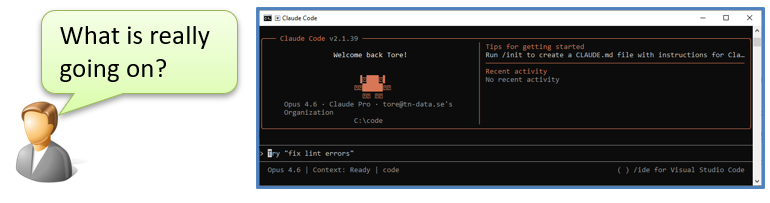
With AI coding agents becoming part of the mainstream developer toolkit, I saw the same need. For most of us, the experience feels like a black box: you type a prompt, something happens behind the scenes, and code appears.
But what is really going on?
I wanted a tool that lets you peek inside that black box and see every API call, every tool invocation, and every decision the agent makes. This tool helps you answer questions like:
- How are tools and MCP servers used by the agent?
- What does the /init command actually do?
- What happens when I enable plan mode?
- How many tokens do my tools and system prompt consume?
- How can an agent read and modify my files?
With insight into the agent’s decisions, you can refine your prompts, reduce unnecessary tool calls, and reduce token costs.
What Is the Coding Agent Explorer?
The Coding Agent Explorer is a .NET reverse proxy combined with a real-time web dashboard. It sits between your coding agent (currently Claude Code) and the Anthropic API, intercepting every request and response that flows between them. Everything it captures is displayed in a live dashboard that you can explore while the agent is working or after the work is complete.
Here’s how the architecture looks at a high level:
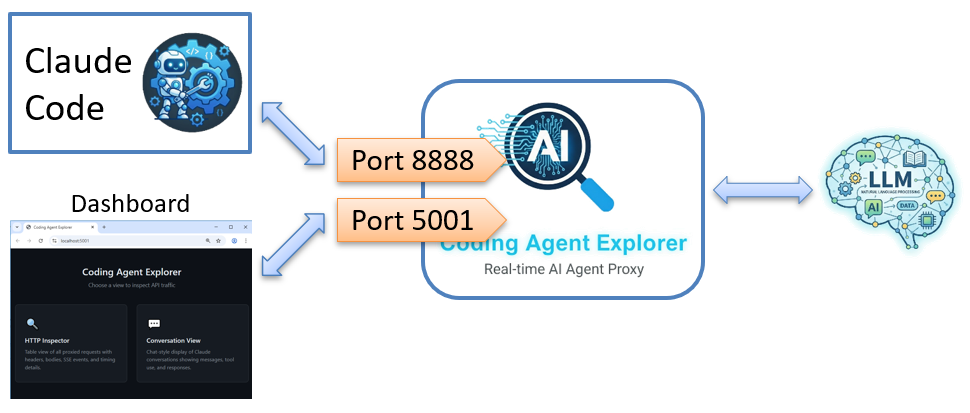
The proxy captures all API traffic and streams it to the dashboard using SignalR for real-time updates. You see everything as it happens with no delay.
On the technology side, the project is built with:
Three Ways to Explore With Coding Agent
The dashboard provides thre complementary views for exploring what the coding agent is doing. Each gives you a different perspective on the same data. The MCP Observer will be covered in a separate blog post.
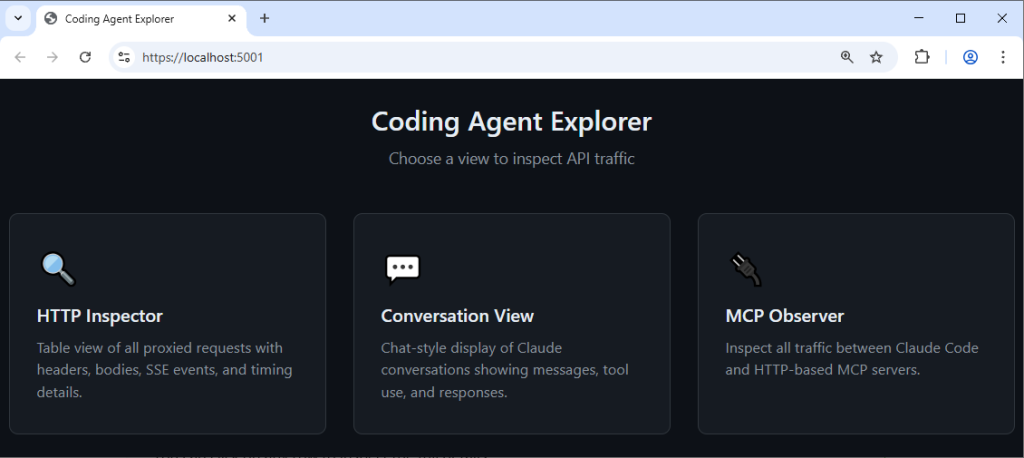
The HTTP Inspector
The HTTP Inspector is the raw, detailed view. It shows every API call in a table with the key information at a glance: timestamp, HTTP method, model used, token counts, and timing.
You can click on any row to inspect the full details:
- Request and response headers in their entirety
- Request and response bodies, formatted for easy reading
- Real-time response data, so you can see the full response as it was received by the agent
- Token usage breakdown: input tokens, output tokens, cache creation tokens, and cache read tokens
- Performance metrics: total duration and time-to-first-token
This view is especially valuable when you want to understand the technical details of the API communication. You can see exactly what the agent sends to the model, what the model responds with, and how long each step takes.
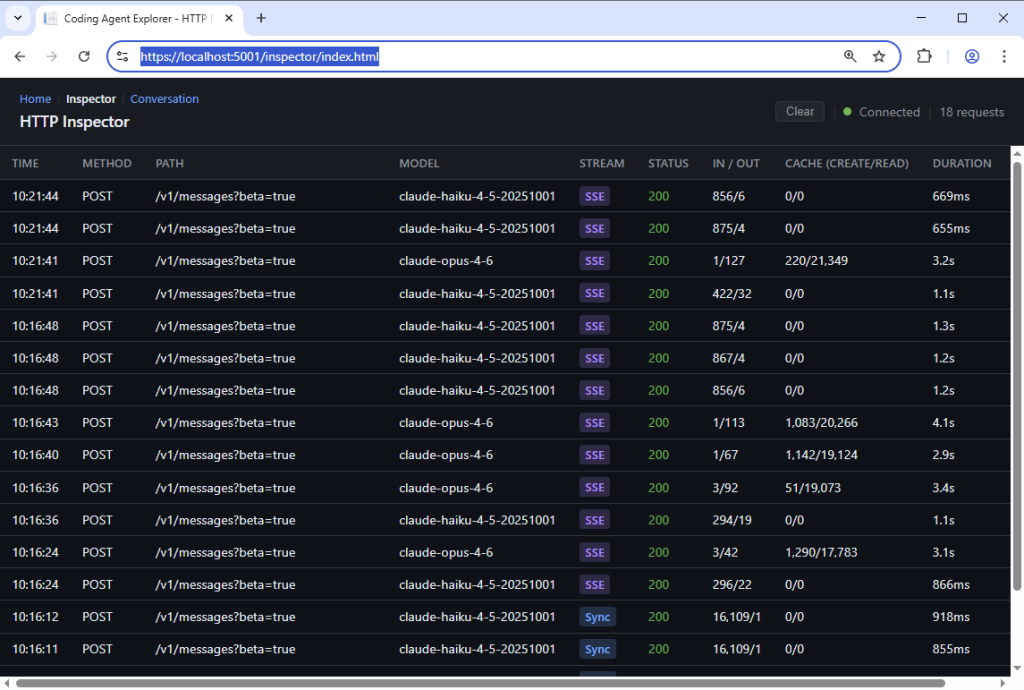
Then, you can click on a given request and view all the request and response details:
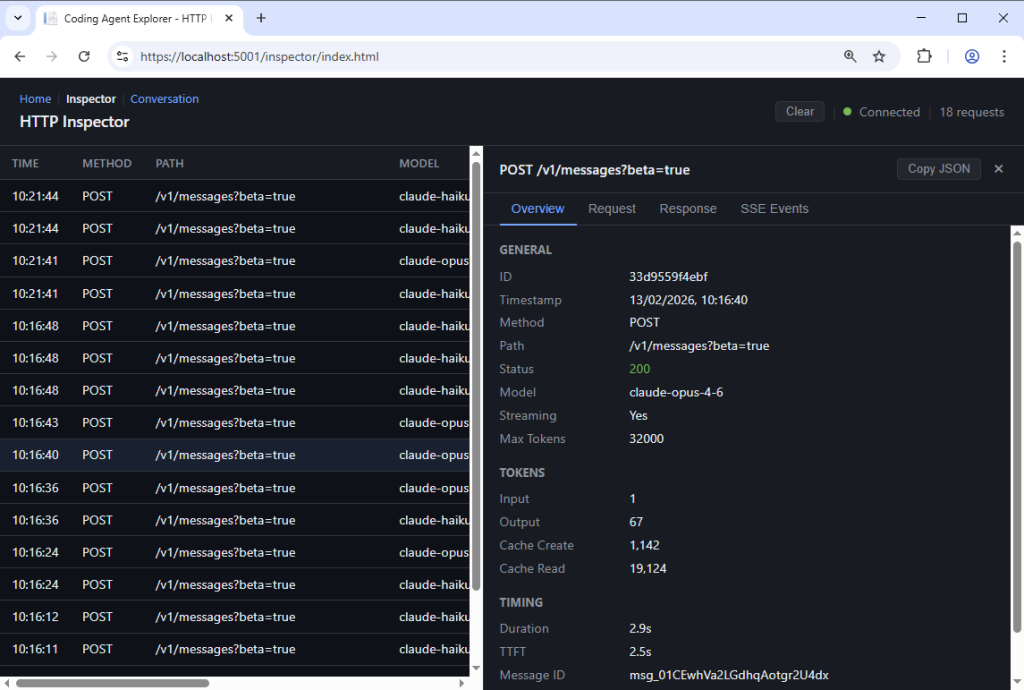
However, this view is useful, but not really helpful when you’re trying to understand how an agent works. This is why we also added the Conversation View, which allows you to make sense of all of these requests.
The Conversation View
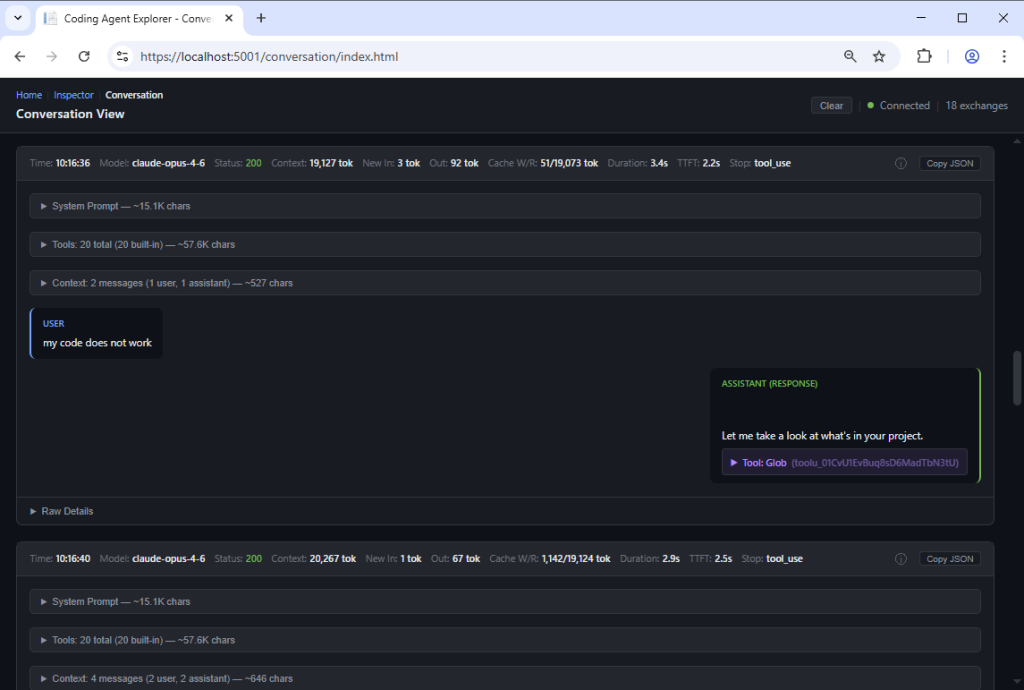
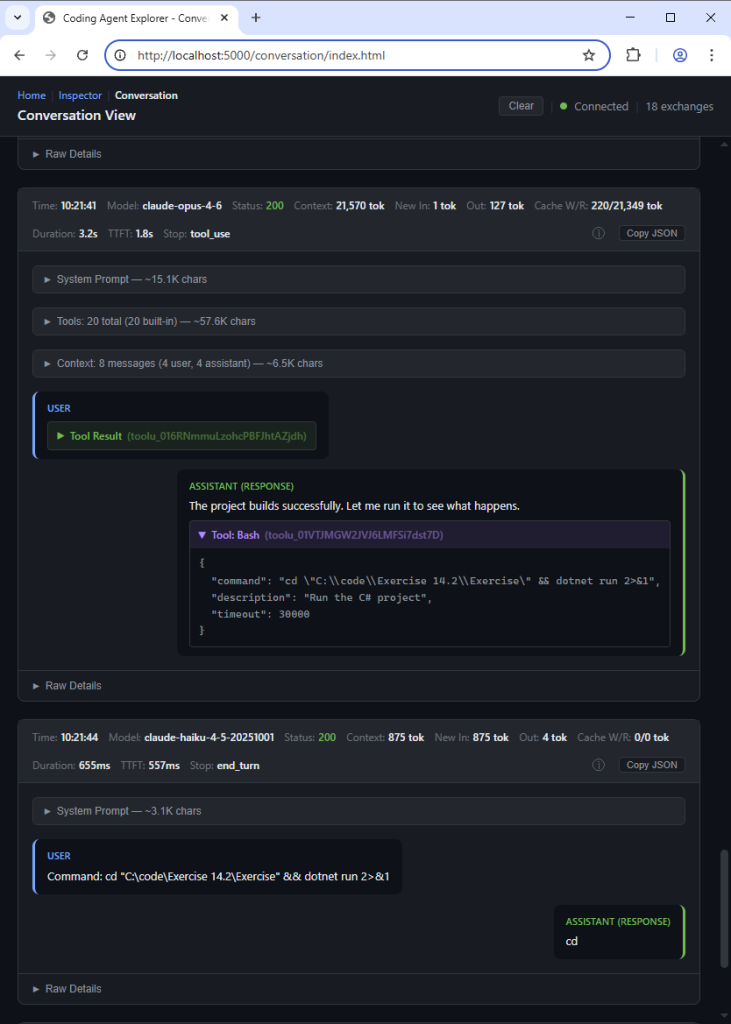
The Conversation View takes the same API data and renders it in a chat-style format that’s easier to follow. Instead of raw HTTP traffic, you see the conversation as it unfolds:
- System prompts that set up the agent’s behavior
- User messages (your prompts)
- Assistant responses with the agent’s reasoning
- Tool calls like Read, Write, Bash, Grep, and others, showing exactly what the agent does
- Tool results showing what came back from each tool invocation
- MCP tool usage, letting you explore how the agent presents and invokes CP servers when communicating with the LLM
Large content sections are also collapsible, so you can focus on the parts that interest you. Each message also provides token and character statistics, giving you a sense of how much context each part of the conversation consumes.
This is the view I use the most in my workshops. It gives you a clear picture of how the agent “thinks”. That shows how it breaks down a problem, which tools it decides to use, and how it iterates toward a solution.
What Can You Learn From It?
Once you start monitoring the agent’s API calls, you’ll discover many things that aren’t obvious from the outside. Here are some of the insights that the Coding Agent Explorer reveals to us:
- How prompts are constructed.
You’ll see the actual system prompts that Claude Code sends to the model. These are far more detailed than you might expect. Impressively, you’ll get to see instructions about tool usage, safety, code style, and more. - Tool usage patterns.
You’ll also see how the model selects and invokes tools like Read, Write, Bash, Grep, and Glob. You’ll notice how it reads files before editing them, how it searches for code, and how it verifies its changes. - Token economics.
It reveals what costs tokens and how prompt caching works. You’ll see cache creation tokens (when the model stores a prompt prefix), and cache read tokens (when it reuses a cached prefix). This is key for understanding performance and cost with these agents. - The agentic conversation loop.
Another cool feature is seeing how the back-and-forth between the agent and the API works. Each “turn” involves the model generating a response (potentially with tool calls), the agent executing those tools, and then sending the results back to the model. This loop continues until the task is complete. - Real-time observation.
You’ll be able to see the entire conversation unfold in real time as the agent works, giving you immediate insight into what it’s doing and why. - Multi-model execution
Observe how tasks are distributed between models such as Haiku and Opus.
Have you wondered why Claude Code sometimes seems to “think” for a while before responding? The Conversation View shows you exactly what’s happening: the agent might be reading multiple files, searching for patterns, or analyzing code before it starts writing its response to you.
Getting Started
Getting the Coding Agent Explorer running doesn’t take as long as you might think; it takes just a few minutes. Here’s the quick version (the GitHub README has full details):
Prerequisites: You’ll need the .NET 10 SDK installed.
1. Clone and run the project:
					git clone https://github.com/tndata/CodingAgentExplorer.git
cd CodingAgentExplorer
dotnet run
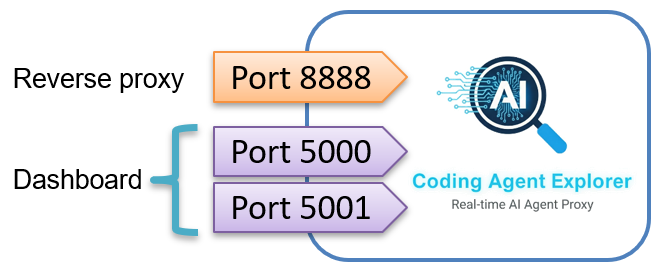
This starts three endpoints:
- The reverse proxy on port 8888
- The web dashboard on ports 5000 (HTTP) and 5001 (HTTPS).
The dashboard opens automatically in your browser.
2. Point Claude Code at the proxy:
On Windows (cmd):
set ANTHROPIC_BASE_URL=http://localhost:8888
On Windows (PowerShell):
$env:ANTHROPIC_BASE_URL = "http://localhost:8888"
The repository also includes EnableProxy.bat and DisableProxy.bat scripts for convenience. These only affect the current terminal session, so closing the terminal automatically clears the setting.
3. Use Claude Code as normal.
Every API call will now flow through the proxy, and you’ll see it appear in the dashboard in real time.
Note: The proxy only listens on localhost and is not exposed to the network. API keys are automatically redacted from the stored data. Request data is kept in memory only (up to 1,000 requests), with no persistence to disk.
It's Time to Understand How Coding Agents Work
AI coding agents are becoming a real part of the daily developer workflow. More and more developers and teams are integrating them into how they write, review, and maintain code.
As .NET developers, we have a tradition of wanting to understand the tools we use, and we’ll ultimately need to bring the same curiosity and rigor into understanding how AI coding agents work, too.
For example, while writing the blog post DefaultAzureCredential Under the Hood, I cloned the Azure SDK for .NET repository and patched the code locally to better understand how the token credential requests access tokens from Azure. That hands-on exploration gave me insights that go beyond what the documentation alone can provide.
For example, we can examine in detail how Claude Code uses its tools:
In my workshops, I often say, “The things you’re scared of, you should do more often.”
If coding agents feel like magic or a mystery, that’s exactly why you should look under the hood. Understanding what the agent does (and doesn’t do) helps you write better prompts, catch mistakes earlier, and build trust in the tool.
I Want Your Feedback!
The Coding Agent Explorer is open-source, and I want to improve it with your help. If you find a bug, have a feature request, or want to share your experience with the tool, please create an issue on GitHub. I read every issue and appreciate all feedback.
Contributions are also welcome!
The codebase is intentionally kept simple (single NuGet dependency, vanilla frontend) to make it easy for anyone to jump in.
Fun fact: The first pull request arrived four days after I published the tool, before I had even announced it.
Currently, the tool only supports Claude Code with the Anthropic API. Support for other coding agents and API providers is on the roadmap. If there’s a specific agent you’d like to see supported, let me know in the issues. Your input helps me prioritize what to build next.
Want to Learn Agentic Development?
If this topic interests you, I’d love to help you go deeper. I am working on a new workshop called “Agentic Development with Claude Code“, where we explore how coding agents work, how to use them effectively, and how to build workflows around them. The Coding Agent Explorer is one of the tools that I use in the workshop to help participants see what’s really happening behind the scenes.
You can read more about the Agentic Development workshop and other development courses here: Agentic Development & Development Workshops.
I also have a presentation called “How Does a Coding Agent Work?” that covers the architecture and inner workings of AI coding agents. Contact me if you’d like me to run this presentation at your company or conference.
More information about my AI development talks is available here: AI Development Talks & Presentations.
Frequently Asked Questions
If you’re considering using the Coding Agent Explorer with Claude Code, these are the most common questions about setup, security, performance, and intended use.
Does this tool work with coding agents other than Claude Code?
Not yet. The Coding Agent Explorer currently only supports Claude Code via the Anthropic API. Support for other coding agents and API providers is on the roadmap. If there’s a specific agent you’d like to see supported, let me know on GitHub.
Does the proxy affect Claude Code’s performance?
The proxy adds minimal overhead. It captures traffic as it passes through, but does not modify or delay requests or responses in any meaningful way.
Is my API key safe?
Yes. API keys (x-api-key and Authorization headers) are automatically redacted from all stored request data. The proxy only listens on localhost, so it is never exposed to the network. All captured data is kept in memory only and is lost when you stop the application.
Do I need to change my code or project to use this?
No. You only need to set a single environment variable (ANTHROPIC_BASE_URL) to point Claude Code at the proxy. Everything else works exactly as before. When you’re done, just close the terminal or clear the variable.
Can I use this in production?
The Coding Agent Explorer is designed as a development and teaching tool. It is not intended for production use. Use it locally when you want to learn, debug, or demonstrate how a coding agent works.
About the Author
Tore Nestenius is a Microsoft MVP in .NET and a senior .NET consultant, instructor, and software architect with over 25 years of experience in software development. He specializes in .NET, ASP.NET Core, Azure, identity architecture, and application security, helping development teams design secure, scalable, and maintainable systems.
Tore delivers .NET workshops, Azure training, and technical presentations for companies and development teams across Europe. His focus is on practical, hands-on learning that helps developers understand modern tooling, cloud architecture, and AI-assisted development.
Learn more on his .NET blog at nestenius.se or explore his workshops and training at tn-data.se.