---
title: "DefaultAzureCredential Under the Hood"
description: "How DefaultAzureCredential works in .NET: the order it tries credentials, why it can be slow, which one it used, and when ChainedTokenCredential is better."
url: https://nestenius.se/azure/default-azure-credentials-under-the-hood/
date: 2024-04-18
author: "Tore Nestenius"
category: "Azure"
tags: ["azure"]
site: https://nestenius.se/
---
# DefaultAzureCredential Under the Hood
The **DefaultAzureCredentials** is key for using Azure services, but how exactly does it work and when should you use it? In this post, we’ll break down how it operates, its challenges, and other ways to access Azure services. This guide will help you get a clearer picture of how to handle Azure authentication simply and effectively.
## Authenticating to Azure
When an application wants to access resources in Azure such as storage or databases, it needs to authenticate itself. To do this, the application must obtain an **access token** from **Entra ID**. This token allows the application to securely access resources in Azure, such as your Azure Storage Account.
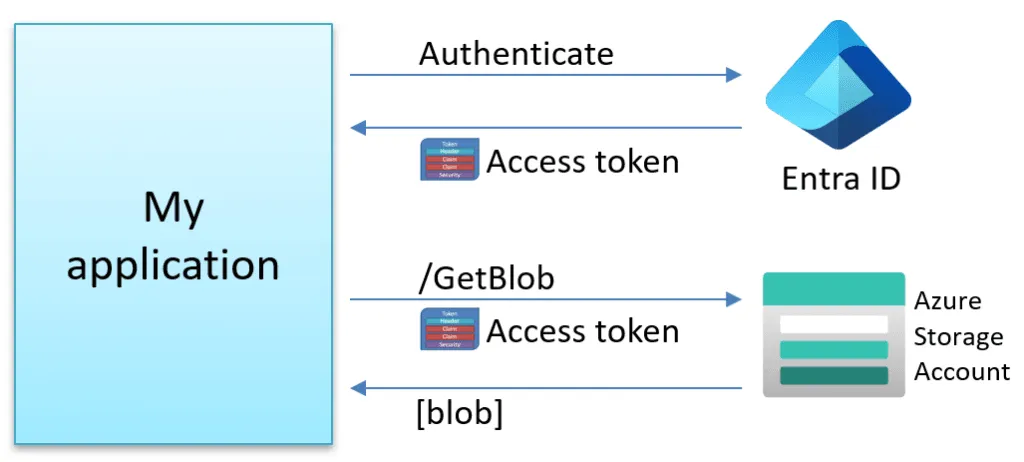
Alternative ways to access resources exist, such as using Shared Access Signature (SAS) tokens, but that is beyond the scope of this blog post.
For example, to access Azure BlobStorage, a TokenCredential is required during client creation. This ensures secure access by authorized users. Here’s an example of that:
```csharp
TokenCredential credentials = ??HowToCreate??;
var client = new BlobServiceClient(
new Uri("https://myblogstorage.blob.core.windows.net"),
credentials);
```
## What does the TokenCredential class represent?
The TokenCredentials type in C# is an abstract base class that contains two methods to request an access token:
```csharp
///
/// Represents a credential capable of providing an OAuth token.
///
public abstract class TokenCredential
{
///
/// Gets an Azure.Core.AccessToken for the specified set of scopes.
///
/// A valid Azure.Core.AccessToken.
public abstract ValueTask GetTokenAsync(TokenRequestContext requestContext,
CancellationToken cancellationToken);
public abstract AccessToken GetToken(TokenRequestContext requestContext,
CancellationToken cancellationToken);
}
```
Microsoft provides many types that implement this abstract class, including:
```csharp
var c1 = new AuthorizationCodeCredential(tenantId: "",
clientId: "",
clientSecret: "",
authorizationCode: "");
var c2 = new AzureCliCredential();
var c3 = new AzureDeveloperCliCredential();
var c4 = new AzurePowerShellCredential();
var c5 = new ChainedTokenCredential();
var c6 = new ClientAssertionCredential(tenantId: "",
clientId: "",
assertionCallback: x => Task.FromResult(""));
var c7 = new ClientCertificateCredential(tenantId: "",
clientId: "",
clientCertificatePath: "");
var c8 = new ClientSecretCredential(tenantId: "",
clientId: "",
clientSecret: "");
var c9 = new DefaultAzureCredential();
var c10 = new DeviceCodeCredential();
var c11 = new EnvironmentCredential();
var c12 = new InteractiveBrowserCredential();
var c13 = new ManagedIdentityCredential();
var c14 = new OnBehalfOfCredential(tenantId: "",
clientId: "",
clientSecret: "",
userAssertion: "");
var c15 = new SharedTokenCacheCredential();
var c16 = new UsernamePasswordCredential(username: "",
password: "",
tenantId: "",
clientId: "");
var c17 = new VisualStudioCodeCredential();
var c18 = new VisualStudioCredential();
var c19 = new WorkloadIdentityCredential();
```
## What do all these TokenCredentials do?
Each TokenCredential type employs its own approach to acquiring the access token needed to access services in Azure. Whether searching for credentials in your system or launching a separate program, the key aim is to obtain this token safely and effectively, ensuring smooth and reliable access to Azure.
For example, the **EnvironmentCredential** type will look for credentials in one of these sets of environment variables:
- **ClientSecret based**
- AZURE\_TENANT\_ID
- AZURE\_CLIENT\_ID
- AZURE\_CLIENT\_SECRET
- **UserName/Password based**
- AZURE\_TENANT\_ID
- AZURE\_CLIENT\_ID
- AZURE\_USERNAME
- AZURE\_PASSWORD
- **Certificate based**
- AZURE\_TENANT\_ID
- AZURE\_CLIENT\_ID
- AZURE\_CLIENT\_CERTIFICATE\_PATH
- AZURE\_CLIENT\_CERTIFICATE\_PASSWORD
Then it will use these credentials to try to acquire an access token from Entra ID.
**VisualStudioCredential** is another type that attempts to launch **Microsoft.Asal.TokenService.exe**, which is an application located in this folder:
```bat
C:\Program Files\Microsoft Visual Studio\2022\Community\Common7\IDE\CommonExtensions\Microsoft\AsalTokenService
```
It is an executable that manages token-based authentication for Microsoft services. It's essential for enabling secure user access to Microsoft Azure and Office 365, and it is also utilized by Visual Studio to authenticate users with Microsoft accounts. This component facilitates secure single sign-on and integrates with Entra ID.
This means that the **BlobServiceClient** shown before accepts any of the above credentials. For example:
```csharp
var blobUri = new Uri("https://myblogstorage.blob.core.windows.net");
var client1 = new BlobServiceClient(blobUri, new AzureCliCredential());
var client2 = new BlobServiceClient(blobUri, new AzureDeveloperCliCredential());
var client3 = new BlobServiceClient(blobUri, new EnvironmentCredential());
var client4 = new BlobServiceClient(blobUri, new WorkloadIdentityCredential());
```
## TokenCredentials in practice
We have a problem: depending on where our app executes, we need to use different TokenCredentials, depending on where it runs. This means that our code might look something like this:
```csharp
TokenCredential credentials = null;
switch (environment)
{
case "dev-visualstudio":
credentials = new VisualStudioCredential();
break;
case "dev-visualstudiocode":
credentials = new VisualStudioCodeCredential();
break;
case "production":
credentials = new ManagedIdentityCredential();
break;
default:
credentials = new AzurePowerShellCredential();
break;
```
This works, but it's hard to maintain; especially if we want to add more options in the future, like using **Azure CLI** or **WorkloadIdentity** with Kubernetes. We need a simpler approach that can work across different environments.
## Introducing DefaultAzureCredential
To solve the above problem, Microsoft introduced the **DefaultAzureCredential** type.
How does it work?
It contains a predefined list of **TokenCredential** types, which it calls in a specific sequence. DefaultAzureCredential systematically checks each one on this list until it successfully finds a matching set of credentials in your environment, as shown in the following picture:
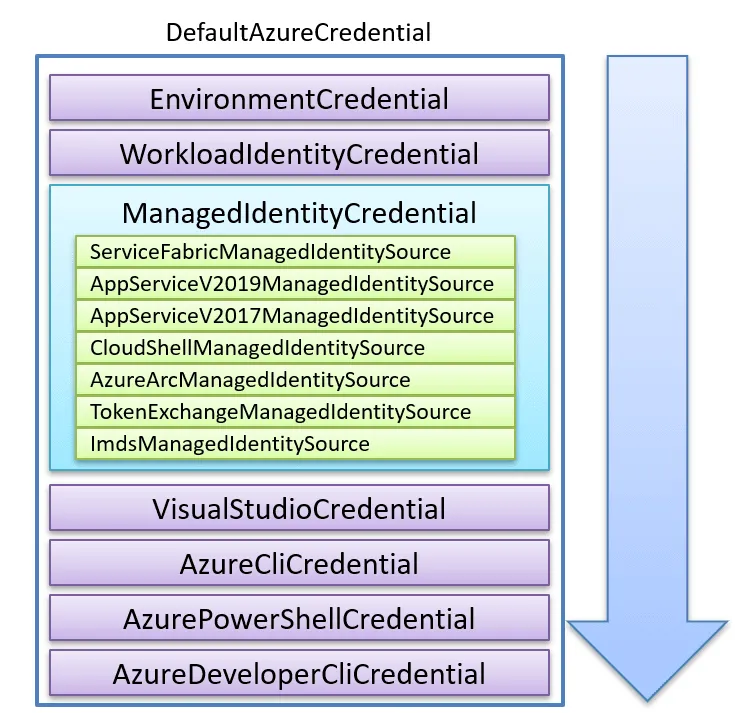
By using this credential type instead of the others, you don’t need to worry about having to specify what credentials to use, as shown in this example below:
```csharp
var client = new BlobServiceClient(
new Uri("https://myblogstorage.blob.core.windows.net"),
new DefaultAzureCredential());
```
The above code will automatically work well in most environments because it tries to locate a valid set of credentials and then retrieve a valid access token.
## What happens if DefaultAzureCredentials can’t find any credentials?
The first thing you notice is that it is slow! It will take **3-8 seconds** to execute all the TokenCredentials on a machine without credentials.
An exception is thrown when it can’t find any valid credentials, and you can see the details in the debugger foreach failed attempt:
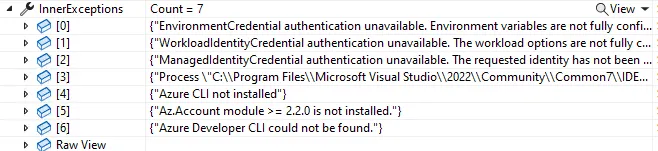
There is a built-in option to disable specific TokenCredentials, like this:
```csharp
var options = new DefaultAzureCredentialOptions
{
ExcludeAzureCliCredential = true,
ExcludeVisualStudioCodeCredential = true
//..
};
var cred = new DefaultAzureCredential(options);
...
```
## Caching of the access token in DefaultAzureCredentials
It's best to create a single instance of DefaultAzureCredential and reuse it throughout your application. This approach is more efficient because it leverages the credential's internal token cache, reducing the need for repeated authentication calls.
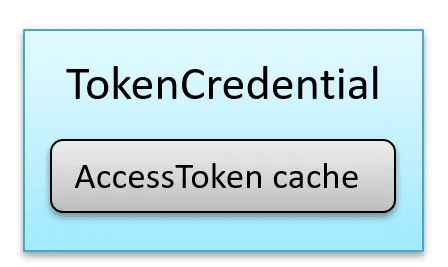
For example:
```csharp
// Create a shared DefaultAzureCredential instance
var sharedCredential = new DefaultAzureCredential();
// Use this shared instance wherever needed
var client1 = new BlobServiceClient(
new Uri("https://example.blob.core.windows.net"),
sharedCredential);
var client2 = new SecretClient(
new Uri("https://example.vault.azure.net"),
sharedCredential);
…
```
## What does the access token look like?
A sample access token can look like this:
```json
{
"aud": "https://storage.azure.com/",
"iss": "https://sts.windows.net/567d82a1-7f61-4da2-b955-xxxxxxxxxxxx/",
"iat": 1712047403,
"nbf": 1712047403,
"exp": 1712051303,
"aio": "E2NgYKh17fZg9vvfwCmWxW+7xxxxxx==",
"appid": "9bfc7d58-9841-415c-9b60-xxxxxxxxxxxx",
"appidacr": "1",
"idp": "https://sts.windows.net/567d82a1-7f61-4da2-b955-xxxxxxxxxxxx/",
"oid": "1e7e2541-1297-4e1a-8b15-xxxxxxxxxxxx",
"rh": "0.AQwAoYJ9VmF_ok25VdMkTqbpdoGmBuTU86hCkLxxxxxxxxxxxx.",
"sub": "1e7e2541-1297-4e1a-8b15-xxxxxxxxxxxx",
"tid": "567d82a1-7f61-4da2-b955-xxxxxxxxxxxx",
"uti": "NpJBNp_iWUql96nbQP4xQA",
"ver": "1.0",
"xms_tdbr": "EU"
}
```
The access token above has a lifetime of 65 minutes, and the library will be in charge of refreshing it when needed.
## How do I know which credential was used?
You might have several credentials saved on your computer. Sometimes, this can cause a problem where the wrong one gets used, leading to access issues that can be tricky to figure out. Enabling logging is one approach to knowing which one was used.
But digging through the logs is perhaps not the most optimal approach. Unfortunately, it does not provide any official other way to tell which credential was actually used. However, using some reflection magic, we can extract this information using the following hack:
```csharp
TokenCredential? GetSelectedCredentials(DefaultAzureCredential? credential)
{
// This is a hack to get the selected token from DefaultAzureCredential.
// The goal is to get the value from this private field found inside DefaultAzureCredential:
//private readonly AsyncLockWithValue _credentialLock;
try
{
var credType = credential?.GetType();
if (credType != null)
{
var _credentialLockField = credType.GetField("_credentialLock", System.Reflection.BindingFlags.NonPublic | System.Reflection.BindingFlags.Instance);
if (_credentialLockField != null)
{
var _credentialLock = _credentialLockField.GetValue(cred);
var _credentialLockType = _credentialLock?.GetType();
if (_credentialLockType != null)
{
var _valueField = _credentialLockType.GetField("_value", System.Reflection.BindingFlags.NonPublic | System.Reflection.BindingFlags.Instance);
if (_valueField != null)
{
var selectedCredential = _valueField.GetValue(_credentialLock);
// Use selectedCredential here
return selectedCredential as TokenCredential;
}
}
}
}
return null;
}
catch (Exception ex)
{
Console.WriteLine("Failed to get selected credential");
return null;
}
}
```
The above method can then be used like this:
```csharp
var credentials = new DefaultAzureCredential();
TokenCredential? selectedCredential = GetSelectedCredentials(cred);
Console.WriteLine("selectedCredential " + selectedCredential.GetType().Name);
```
## What are the problems with DefaultAzureCredential?
While it is highly convenient and user-friendly, it also has its drawbacks. A notable issue arises in debugging: pinpointing which one was used becomes challenging if it selects an incorrect or unexpected credential.
**Pro tip #1**: I have created a handy [open-source Cloud Debugger for Azure](https://nestenius.se/azure/introducing-the-cloud-debugger-for-azure/) which can help with this and more. I also teach devs how to use it in my upcoming course '[Introduction to Azure for Developers](https://tn-data.se/courses/introduction-to-azure-for-developers-workshop/)'.
**Pro tip #2:** Stay Updated with the Latest [.NET News & Azure](https://dotnetnews.co/)
## What are the alternatives to DefaultAzureCredential?
An alternative is the **ChainedTokenCredential** type. It functions similarly to DefaultAzureCredential, with the key difference being that it starts with an empty list of TokenCredentials. With ChainedTokenCredential, you can add only the credential types relevant to your needs in the order that works best for you.
This approach can be particularly advantageous for production environments, as it puts you in complete control and limits the credentials to only those you actively use.
For instance, you could set it up like this:
```csharp
var cred = new ChainedTokenCredential(
new EnvironmentCredential(),
new ManagedIdentityCredential(),
new VisualStudioCodeCredential());
…
```
## Logging and diagnostics
A simple way to get insights into what happens under the hood is to add the following code to the start of your application:
```csharp
var listener = new AzureEventSourceListener((e, message) =>
{
Console.WriteLine(e.EventSource.Name);
if (e.EventSource.Name.StartsWith("Azure"))
{
Console.WriteLine($"{DateTime.Now} {message}");
}
},
level: EventLevel.Verbose);
var totalTimeSw = new Stopwatch();
totalTimeSw.Start();
```
This allows you to capture the internal events produced by the Azure libraries, which can give you valuable insights into their inner workings.
## Final gotcha
A common issue encountered with these credential helpers revolves around the **TenantId**. Often, difficulties with these types stem from a missing TenantId. To mitigate this, the TenantId can typically be specified through an optional options object or by setting environment variables. For instance, when using **VisualStudioCredential**:
```csharp
var options = new VisualStudioCredentialOptions()
{
TenantId = "xxxxx"
};
var credentials = new VisualStudioCredential(options);
```
## Summary
Writing this blog post has been a great learning experience for me. It's helped me better understand TokenCredential types, especially about when to use DefaultAzureCredential and ChainedTokenCredential.
I gained deeper insights by downloading the Azure Identity source code from [GitHub](https://github.com/Azure/azure-sdk-for-net/tree/main/sdk/identity/Azure.Identity) and turning it into my own class library. With this in place, I could add my own logging and diagnostic code. These additions really helped me get a better grasp of how everything functions.
## Related posts
- [Persisting the ASP.NET Core Data Protection Keys Ring in Azure Key Vault](https://nestenius.se/net/persisting-the-asp-net-core-data-protection-key-ring-in-azure-key-vault/)
- [Exploring what is inside the ASP.NET Core cookies](https://nestenius.se/net/exploring-what-is-inside-the-asp-net-core-cookies/)
- [Demystifying OpenID Connect's State and Nonce Parameters in ASP.NET Core](https://nestenius.se/net/demystifying-openid-connects-state-and-nonce-parameters-in-asp-net-core/)
- [Deploy Container to Azure App Services with System-Assigned Identity](https://nestenius.se/azure/deploy-a-container-to-azure-app-services-using-a-system-assigned-identity/)
- [Introducing the Coding Agent Explorer (.NET)](https://nestenius.se/ai/introducing-the-coding-agent-explorer-net/)
## Related Training Workshops
- [Introduction to Azure for Developers](https://tn-data.se/courses/introduction-to-azure-for-developers-workshop/)
- [C# – Beyond the Fundamentals](https://tn-data.se/courses/csharp-beyond-the-fundamentals/)
## Feedback, comments, found any bugs?
Let me know if you have any feedback, anything I missed or any bugs/typos. You can find my contact details on the [contact page](https://nestenius.se/contact/).
## Related Development Services:
- [Azure Cloud Development Services](https://tn-data.se/consulting/)
- [Developer Coaching](https://tn-data.se/consulting/) (IdentityServer, .NET, ASP.NET Core, and Azure)
- [Duende IdentityServer Consulting Services](https://tn-data.se/duende-identityserver-consulting-services/)
- [.NET Development Services](https://tn-data.se/consulting/)